
In the previous dvSwitch posts (see Part1 & Part2) I created a dvSwitch with a dvPortgroup, and we migrated some guests to this dvSwitch .
In this part I’ll show you how to create Service Console and vmKernel portgroups over the dvSwitch. Again, all the shown scripts will do a minimal configuration of the new portgroups. More advanced configurations will be discussed in future posts in the dvSwitch series.
This is the schematic view of the configuration that we currently have.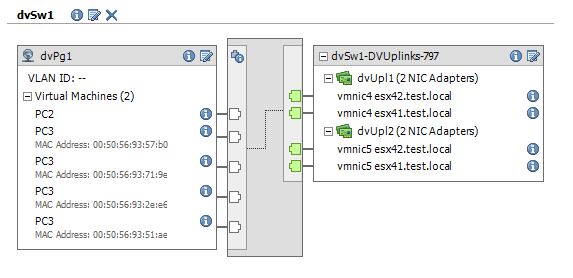
Update May 21th 2011
The functions Set-dvSwPgvMotion and Set-dvSwPgFTLogging have been added. They allow, respectively, to set vMotion and Fault Tolerance logging on a VMKernel portgroup.
The Service Console and the vmKernel portgroups will have to be created on each ESX host that is connected to the dvSwitch, separately. Or you can create these portgroups on one ESX host and then use a Host Profile to push the configuration to the other ESX hosts.
To create these two portgroups I will use the AddServiceConsoleVirtualNic and the AddVirtualNic methods.
Upon closer examination of both methods it is obvious that they both use the same parameters. Only the name of the method changes. This allows me, like any good administrator ;-), to use the path of least effort and write one function to do the work and one “wrapper” functions for each of the two methods.
|
1 2 3 4 5 6 7 8 9 10 11 12 13 14 15 16 17 18 19 20 21 22 23 24 25 26 27 28 29 30 31 32 33 34 35 36 37 38 39 40 41 42 43 44 45 46 47 48 49 50 51 52 53 54 55 56 57 58 59 60 61 62 63 64 65 66 67 68 69 70 71 72 73 74 75 76 77 78 79 80 81 82 83 84 85 86 87 88 89 90 91 92 93 94 95 96 97 98 99 100 |
function Get-dvSwitch{ param($dcName,$dvSwName) $dcNetFolder = Get-View (Get-Datacenter $dcName | Get-View).NetworkFolder $found = $null foreach($net in $dcNetFolder.ChildEntity){ if($net.Type -eq "VmwareDistributedVirtualSwitch"){ $temp = Get-View $net if($temp.Name -eq $dvSwName){ $found = $temp } } } $found } function New-InternaldvSwvNic{ param($method, $esxName, $dvSwName, $dvPgName, $ipAddr, $ipNetmask) $esx = Get-View -ViewType HostSystem -Filter @{"Name"=$esxName} $hostNetSys = Get-View $esx.configManager.NetworkSystem # Find Datacenter $node = $esx while($node.gettype().Name -ne "Datacenter"){ $node = Get-View $node.Parent } $dvSw = Get-dvSwitch $node.Name $dvSwName # Find PortGroup $dvSwPg = $dvSw.Portgroup | %{Get-View $_} | where {$_.Name -eq $dvPgName} $nic = New-Object VMware.Vim.HostVirtualNicSpec $nic.ip = New-Object VMware.Vim.HostIpConfig $nic.ip.dhcp = $false $nic.ip.ipAddress = $ipAddr $nic.ip.subnetMask = $ipNetmask $nic.distributedVirtualPort = New-Object VMware.Vim.DistributedVirtualSwitchPortConnection $nic.distributedVirtualPort.switchUuid = $dvSw.Uuid $nic.distributedVirtualPort.portgroupKey = $dvSwPg.Key switch($method){ "SC"{ $hostNetSys.AddServiceConsoleVirtualNic($null, $nic) } "Kern"{ $hostNetSys.AddVirtualNic($null, $nic) } } } function New-dvSwConsole{ param($esxName, $dvSwName, $dvPgName, $ipAddr, $ipNetmask) New-InternaldvSwvNic "SC" $esxName $dvSwName $dvPgName $ipAddr $ipNetmask } function New-dvSwvmKernel{ param($esxName, $dvSwName, $dvPgName, $ipAddr, $ipNetmask) New-InternaldvSwvNic "Kern" $esxName $dvSwName $dvPgName $ipAddr $ipNetmask } function Set-dvSwPgvMotion{ param($esxName, $vNicName) $esx = Get-View -ViewType HostSystem -Filter @{"Name"=$esxName} $vmotionSys = Get-View $esx.configManager.vmotionSystem $vmotionSys.SelectVnic($vNicName) } function Set-dvSwPgFTLogging{ param($esxName, $vNicName) $esx = Get-View -ViewType HostSystem -Filter @{"Name"=$esxName} $vnicMgr = Get-View $esx.configManager.virtualNicManager $vnicMgr.SelectVnicForNicType("faultToleranceLogging", $vNicName) } $esxName = "esx41.test.local" $dvSwitchName = "dvSw1" $dvPortgroupName = "dvPg1" $dvSCIp = "192.168.111.151" $dvSCMask = "255.255.255.0" $dvKernIp = "192.168.145.191" $dvKernMask = "255.255.255.0" $dvSCName = New-dvSwConsole $esxName $dvSwitchName $dvPortgroupName $dvSCIp $dvSCMask Write-Host "Created Service Console pg:" $dvSCName $dvKernName = New-dvSwvmKernel $esxName $dvSwitchName $dvPortgroupName $dvKernIp $dvKernMask Write-Host "Created vmKernel pg:" $dvKernName Set-dvSwPgvMotion $esxName $dvKernName Write-Host "Enabled vMotion on:" $dvKernName Set-dvSwPgFTLogging $esxName $dvKernName Write-Host "Enabled FT logging on:" $dvKernName |
Annotation:
Line 1: the function Get-dvSwitch already appeared in Part 2 of the series.
Line 17: this is actual function that creates the Service Console portgroup or the vmKernel portgroup depending on the value of the $method parameter.
Line 52: wrapper function for the creation of a Service Console portgroup
Line 58: wrapper function for the creation of a vmKernel portgroup
To recap, this is the schematic view of what we have on the dvSwitch after the end of Part 3.
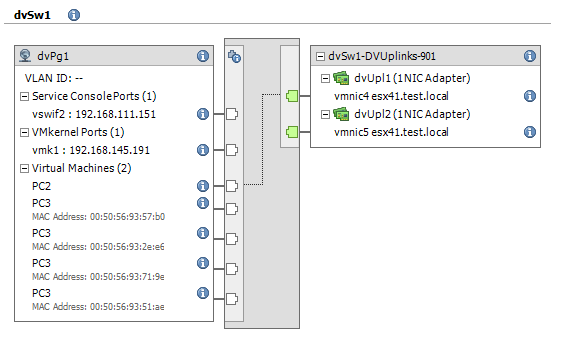 In the next part I’ll be looking at NIC Teaming and some of the policies that can be used on a dvSwitch and it’s portgroups.
If there are any dvSwitch-related scripting questions please let me know and I’ll try to take it up in one of the future posts in the dvSwitch series.
Reuben
Hi,
Would you please help me to add an already used nic of a host in DVS. When we create new DVS it doesn’t show any busy/used nics. But when we do, add host… it shows even the used nics which are part of other VSS or DVS.
Thanks,
Reuben
Rajesh
HI Luc,
Your work helped me lot. I am not able to find the way to live migrate vmkernal nic from std switch to dvSwitch with powercli. Can it be possible with powercli without dvswitch cmdlets.
Thanks
LucD
Hi Rajesh, no sure what you mean by “… without dvswitch cmdlets“.
To manipulate a dvSwitch you will have to use the PowerCLI dvSwitch cmdlets or call the dvSwitch API directly.
vStig
Luc,
Love your work. A question about the function to create a VMkernel virtual adapter … how does one enable VMotion on the resulting vmkernel interface?
Thanks!
vStig
LucD
@vStig, thanks.
I have added 2 new functions to enable vMotion and to enable FT logging on a vmKernel portgroup.
Dickson
Hi Luc:
I have just found that ESXi do not need service console but I still have problem trying to create the vmkernel. I got the following error:
PS C:\Users\dilam> $dvKernIp = “10.89.83.238”
PS C:\Users\dilam> $dvKernMask = “255.255.255.240”
PS C:\Users\dilam> $dvSCName = New-dvSwvmKernel $esxName $dvSwitchName $dvPortgroupName $dvKernIp $dvKernMask
Exception calling “AddVirtualNic” with “2” argument(s): “An error occurred during host configuration.”
At line:26 char:32
+ $hostNetSys.AddVirtualNic <<<< ($null, $nic)
+ CategoryInfo : NotSpecified: (:) [], MethodInvocationException
+ FullyQualifiedErrorId : DotNetMethodException
Do you know what is the problem?
Thanks
Dickson
Hi Luc:
I am new to the Vmware and your stuff really help but when I try to create the service console, I get the following error:
PS C:\Users\dilam> $esxName = “nw072b-ucs.cisco.com”
PS C:\Users\dilam> $dvSwitchName = “dvSwitch”
PS C:\Users\dilam> $dvPortgroupName = “dvServiceConsole”
PS C:\Users\dilam> $dvSCIp = “10.89.83.238”
PS C:\Users\dilam> $dvSCMask = “255.255.255.240”
PS C:\Users\dilam> $dvSCName = New-dvSwConsole $esxName $dvSwitchName $dvPortgroupName $dvSCIp $dvSCMask
Exception calling “AddServiceConsoleVirtualNic” with “2” argument(s): “The operation is not supported on the object.”
At line:23 char:46
+ $hostNetSys.AddServiceConsoleVirtualNic <<<< ($null, $nic)
+ CategoryInfo : NotSpecified: (:) [], MethodInvocationException
Do you know what is the problem?
+ FullyQualifiedErrorId : DotNetMethodException
Daniel Crider
Thanks Luc! Worked like a charm!
Daniel Crider
Luc –
I really appreciate the stuff you have posted. It has helped a lot. One problem that I am currently struggling with is how to change the physical nics that are assigned to a distributed switch. I have the code to remove the nic. But not how to add a nic if the switch already exists. Or how to add a second nic and team them. What I was trying was:
$h = get-vmhost $ESXhost
$hview = get-view $h.id
$hostnum = $h.id
$vdsUUID = ($myvds = Get-VDS | Where-Object {$_.Name -like “vDS-Production”}).Uuid
$vdsID = (Get-VDS | Where-Object {$_.Name -like “vds-Production”}).id
$config = New-Object VMware.Vim.HostNetworkConfig
$config.proxySwitch = New-Object VMware.Vim.HostProxySwitchConfig[] (1)
$config.proxySwitch[0] = New-Object VMware.Vim.HostProxySwitchConfig
$config.proxySwitch[0].changeOperation = “edit”
$config.proxySwitch[0].uuid = $vdsUUID
$config.proxySwitch[0].spec = New-Object VMware.Vim.HostProxySwitchSpec
$config.proxySwitch[0].spec.backing = “vmnic2”
$changeMode = “modify”
$b = [regex]::split($hostnum,”-“)
$hostnet = “HostNetworkSystem-networkSystem-” + $b[2]
$_this = Get-View -Id $hostnet
$_this.UpdateNetworkConfig($config, $changeMode)
If $config.proxySwitch[0].spec.backing = $null it will delete the current nic. But when I try to hand it a string with the nic I want I get an error. I know I am not formatting spec.backing correctly — it does not want a string. But I am not sure how to point it to the vmnic (or vmnics) that I want to assign.
I am sure there is a better way to get $hostnet as well.
Thanks!!
LucD
Thanks Daniel.
The next part in the dvSwitch series will cover NIC teaming.
I will add some functions for adding and removing pNICs. Good idea btw.
Should be published in the coming days.
I suspect the backing for a pNIC should be defined like this:
…
$config = New-Object VMware.Vim.HostNetworkConfig
$config.proxySwitch = New-Object VMware.Vim.HostProxySwitchConfig
$config.proxySwitch[0] = New-Object VMware.Vim.HostProxySwitchConfig
$config.proxySwitch[0].changeOperation = “edit”
$config.proxySwitch[0].uuid = $vdsUUID
$config.proxySwitch[0].spec = New-Object VMware.Vim.HostProxySwitchSpec
$config.proxySwitch[0].spec.backing = New-Object VMware.Vim.DistributedVirtualSwitchHostMemberPnicBacking
$config.proxySwitch[0].spec.backing.pnicSpec = New-Object VMware.Vim.DistributedVirtualSwitchHostMemberPnicSpec
$config.proxySwitch[0].spec.backing.pnicSpec[0].pnicDevice = “vmnic2”
…