
Today the Dutch VMUG event 2009 took place. It was my first visit but this truly is an amazing event. Lots of knowledgeable and interested visitors.
During my session I showed some small, handy scripts that I use on a regular base. In fact they are stored in my profile.
As promised, here are the scripts.
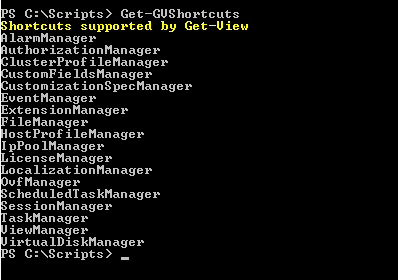
Since I can never remember for which vSphere Managers the Get-View cmdlet accepts a shortcut, I wrote the following.
|
1 2 3 4 5 6 7 8 9 10 11 12 |
function Get-GVShortcuts{ Write-Host "Shortcuts supported by Get-View" -ForegroundColor yellow $si = Get-View ServiceInstance $si.content | gm -MemberType Property | % { if($_.Name -match "Manager"){ $t = Get-View $_.Name -ErrorAction SilentlyContinue if($t -ne $null){ Write-Host $_.Name } } } } |
Annotation
Line 6: use the -ErrorAction SilentlyContinue to suppress all error messages
It produces the following output
Another script that comes in handy from time to time is this little script.
In only 10 lines of PowerShell code it recursively prints out the hierarchy of your vSphere environment.
|
1 2 3 4 5 6 7 8 9 10 11 12 |
filter Get-AllViObjects{ $children = @() Write-Host $global:offset $_.GetType().Name " - " $_.Name $global:offset += "-" if($_.ChildEntity){$children += $_.ChildEntity} if($_.datastoreFolder){$children += $_.datastoreFolder} if($_.hostFolder){$children += $_.hostFolder} if($_.networkFolder){$children += $_.networkFolder} if($_.vmFolder){$children += $_.vmFolder} $children | % {Get-View $_ | Get-AllViObjects} $global:offset = $global:offset.Substring(1) } |
It produces the following output when you feed it the rootFolder.
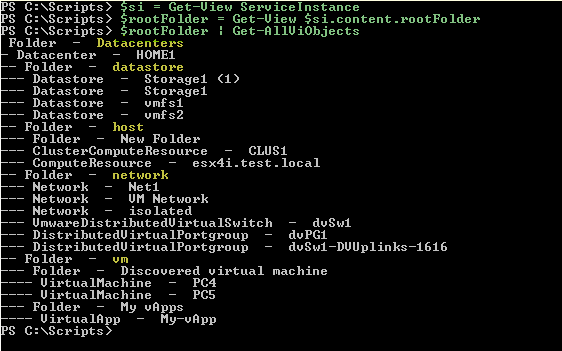
Note that the hierarchy also shows all the “hidden” vSphere folders (Datacenters, datastore, host, network, vm).
joeschmoe
I have been trying to reverse-engineer your script without much luck (don’t really know PS that well). I am trying to get something that returns only the datastore folders, not the volumes (child objects). Is this possible?
LucD
Not 100% sure what you want, but if it is anything like this
then you just have to comment out a couple of lines in the script
filter Get-AllViObjects{

$children = @()

Write-Host $global:offset $_.GetType().Name " - " $_.Name

$global:offset += "-"

if($_.ChildEntity){$children += $_.ChildEntity}

if($_.datastoreFolder){$children += $_.datastoreFolder}

# 	if($_.hostFolder){$children += $_.hostFolder}

# 	if($_.networkFolder){$children += $_.networkFolder}

# 	if($_.vmFolder){$children += $_.vmFolder}

$children | % {Get-View $_ | Get-AllViObjects}

$global:offset = $global:offset.Substring(1)

}

$si = Get-View ServiceInstance

Get-View $si.content.Rootfolder | Get-AllViObjects
afokkema
Two great scripts indeed. Thanks for mentioning my website during your session.
Alan Renouf
2 very cool and handy scripts