
In a comment on one of the previous dvSwitch posts, see dvSwitch scripting – Part 2 – dvPortgroup, Gert asked how he could check if a portgroup with a specific VLAN Id existed on a distributed virtual switch.
Since a function that allows you to search for a portgroup that meets specific requirements can be quite useful, I decided to create a new function to do just that.
Additionally I will show in this post how you can change the VLAN Id of a specific portgroup.
The script that accomplishes this is quite simple.
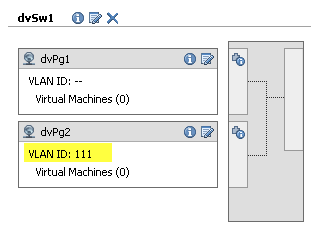
This is the dvSwitch and portgroup configuration from which we start.
|
1 2 3 4 5 6 7 8 9 10 11 12 13 14 15 16 17 18 19 20 21 22 23 24 25 26 27 28 29 30 31 32 33 34 35 36 37 38 39 40 41 42 43 44 45 46 47 48 49 50 51 52 53 54 55 56 57 58 59 60 61 62 63 |
function Get-dvSwitch{ param($dcName,$dvSwName) $dcNetFolder = Get-View (Get-Datacenter $dcName | Get-View).NetworkFolder $found = $null foreach($net in $dcNetFolder.ChildEntity){ if($net.Type -eq "VmwareDistributedVirtualSwitch"){ $temp = Get-View $net if($temp.Name -eq $dvSwName){ $found = $temp } } } $found } function Get-dvSwPg{ param($dvSw, [string]$PGName, [int]$VLANnr) # Search for Portgroup Name if($PGName){ $dvSw.Portgroup | %{Get-View -Id $_} | ` where{$_.Name -eq $PGName} } # Search for VLAN number elseif($VLANnr){ $dvSw.Portgroup | %{Get-View -Id $_} | ` where{$_.Config.DefaultPortConfig.Vlan.VlanId -eq $VLANnr} } } function Set-dvSwPgVLAN{ param($dvSw, $dvPg, $vlanNr) $spec = New-Object VMware.Vim.DVPortgroupConfigSpec $spec.defaultPortConfig = New-Object VMware.Vim.VMwareDVSPortSetting $spec.DefaultPortConfig.vlan = New-Object VMware.Vim.VmwareDistributedVirtualSwitchVlanIdSpec $spec.defaultPortConfig.vlan.vlanId = $vlanNr $dvPg.UpdateViewData() $spec.ConfigVersion = $dvPg.Config.ConfigVersion $taskMoRef = $dvPg.ReconfigureDVPortgroup_Task($spec) $task = Get-View $taskMoRef while("running","queued" -contains $task.Info.State){ $task.UpdateViewData("Info") } } $datacenterName = "Home1" $dvSwitchName = "dvSw1" $dvSwPgName = "dvPg2" $dvSw = Get-dvSwitch $datacenterName $dvSwitchName $dvSwPg = Get-dvSwPg $dvSw -VLANnr 111 if($dvSwPg){ Set-dvSwPgVLAN $dvSw $dvSwPg 901 } |
Annotations
Line 1-15: The Get-dvSwitch function was already presented in Part 2 of the dvSwitch series.
Line 18-20: The Get-dvSwPg function uses for now two parameters with which it can look for a specific portgroup. These are the portgroup name and the VLAN id. The function can easily be extended to look for other properties that uniquely distinguish a portgroup. Also note that the function only takes one of the parameters, so it is either the portgroup name or the VLAN Id for now.
Line 34-51: The Set-dvSwPgVLAN function configures a portgroup with the provided VLAN Id.
Line 42-43: As always, it is critical to provide the “current” config version, otherwise the call to the ReconfigureDVPortgroup_Task method will fail.
Line 59: A sample call to the Get-dvSwPg function. In this sample the VALN Id is used to find the portgroup. If no matching portgroup is found, the function will returm $null.
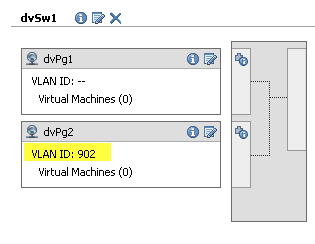
Line 62: A sample call to the Set-dvSwPgVLAN function. It changes the VLAN Id from 111 to 902 in this example.
The result of the above script:
Feel free to post comments and questions.
Ole
Great! Thank you!
Ole
Exactly.
LucD
Ole, have a look at the updated dvSwitch scripting – Part 2 – dvPortgroup post. You can now define VLAN types !
Ole
Hi,
I’ve found great use of your examples, but one tiny, yet important thing keeps stopping me. When I add a distributed portgroup, how do specify that is of “Vlan type: VLAN”? I can create portgroups and change vlanID – but can’t find the propery to change it to vlan! :-/
LucD
Hi Ole, I suspect you mean the choice between “none”, “VLAN”, “VLAN Trunking” and “Private VLAN” for the VLAN type field in the vSphere Client when you create a new portgroup ?
gert van gorp
thanks luc,
this will make my scripting a bit easier. Wil test & implement it next week because I am in the states on a vmware partner conference.
greetings
Gert
LucD
Gert,
Enjoy your stay at PEX.
Just let me know if it works for you when you’re back.
Luc.