
I received an interesting comment on my Events – Part 7 : Working with extended events – Update Manager post from Suresh. He wanted to know if it was possible to create a similar report with the vCenter Update Manager PowerCLI cmdlets as you can get with the esxupdate query command.

After some deep-diving in the VMware.VumAutomation cmdlets, I discovered that this question could probably not be answered with the VMware.VumAutomation cmdlets . On top of that, the current build seems to have a problem with Get-Baseline cmdlet when you use the -Inherit parameter.
So, as always, into the SDK 😉
Luckily, the HostPatchManager holds the answer. Via the QueryHostPatch_Task method you have access to all the installed bulletins.
Update June 25th 2010: after comments from Suresh and James I investigated what goes wrong when you run the script against an ESXi server. It turned out that the QueryHostPatch_Task method doesn’t return the bulletins for ESXi hosts.
And this seems to be consistent with the behaviour of the esxupdate query command.
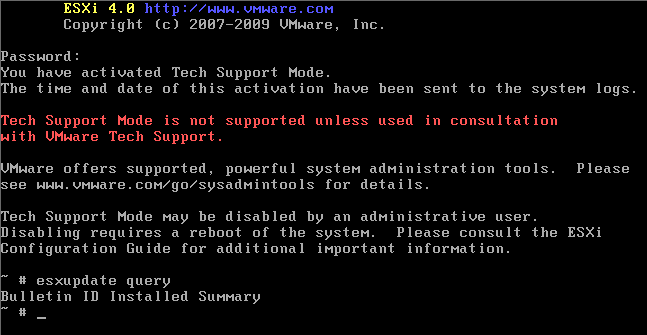
I’m not sure if this is to be considered a bug or if this is intentional !
The script has been updated to display a warning when run against an ESXi server.
Update June 30th 2010: After further investigation it looks as if the problem only exist for ESXi 4 and ESXi 4u1 servers. Until further conclusive test I have adapted the script.
The script
|
1 2 3 4 5 6 7 8 9 10 11 12 13 14 15 16 17 18 19 20 21 22 23 24 25 26 27 28 29 30 31 32 33 |
$report = @() Get-View -ViewType HostSystem -Filter @{"Name"="esx4i.test.local"} | %{ $esx = $_ if($esx.Config.Product.ProductLineId -ne "embeddedesx" -or ($esx.Config.Product.ProductLineId -eq "embeddedesx" -and $esx.Config.Product.Build -ge 261974)){ $patchMgr = Get-View $esx.ConfigManager.PatchManager # $spec = New-Object VMware.Vim.HostPatchManagerPatchManagerOperationSpec # $spec.cmdOption = "-a" # $taskMoRef = $patchMgr.QueryHostPatch_Task($spec) $taskMoRef = $patchMgr.QueryHostPatch_Task($null) $task = Get-View $taskMoRef while("running","queued" -contains $task.Info.State){ sleep 2 $task.UpdateViewData("Info") } $result = [xml]$task.Info.Result.XmlResult $result."esxupdate-response".bulletin | %{ $row = "" | Select ESX,"Bulletin ID",Installed,Summary $row.ESX = $esx.Name $row."Bulletin ID" = $_.id $row.Installed = [datetime]$_.installDate $row.Summary = $_.summary $report += $row } } else{ Write-Host -fo red "Host: " -NoNewline Write-Host -fo white $esx.Name -NoNewline Write-Host -fo red " OS: " -NoNewline Write-Host -fo white $esx.Config.Product.FullName -NoNewline Write-Host -fo gray " does not support the QueryHostPatch method" } } $report | Sort-Object -Property ESX,Installed | ft -AutoSize |
Annotations
Line 4: Check if the host runs an ESXi version.
Line 9: For our initial purpose we don’t need any of the properties in the HostPatchManagerPatchManagerOperationSpec object. Note that you could pass esxupdate options. If you add for example the option -a, the method will return all bulletins, not just the ones that are applicable. You will need to uncomment lines 6-8 and comment out line 9.
Line 15: The result is returned as an XML object.
Line 16: All returned bulletins are a node under “esxupdate-response”.bulletin. Note that we need the quotes around the first path element, otherwise the dash would pose problems.
Sample output
The script, as it is written above, dumps the results to the console. But you can just as well send the results to a CSV or XLS (see my Beyond Export-Csv: Export-Xls post) file.
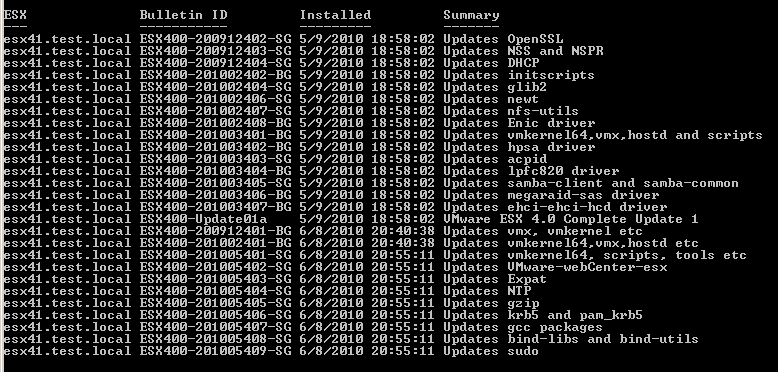
Note that the script can run against all or a selection of your ESX servers in 1 run. You can use the -Filter parameter on the Get-View cmdlet or you can use a Where-Object cmdlet to select specific ESX hosts.
If one of the hosts you selected runs an ESXi version, the script will display a message on the console.

A nice addition to your daily reports for your ESX servers.
mr rosh
Any chances for a revised code that would work ESXi 6.5 and above?
Arvinth
Hey Luc,
though this is older thread, i have some complicated requirement. where i need to fetch the report on the esx3.5 hosts on installed security patches. the above script was not working and giving a blank output, all my hosts are 3.5.so we used plink way of extracting the report.
below is what I used.
$esxpwd = “********”
$plink = “C:\plink.exe”
$plinkoptions = ” -v -pw $esxpwd”
$remoteCommand=”‘esxupdate query | grep -i ESX350-201012410-BG; esxupdate query | grep -i ESX350-201302402-BG'”
$VC = Connect-VIServer -Server servername
$listhost = Get-VMHost
“Summary of Actions” | Out-File -FilePath .\output.txt
foreach ($esxhost in $listhost)
{
“——————————–” | Out-File -FilePath .\output.txt -Append
“Processing for the host $esxhost” | Out-File -FilePath .\output.txt -Append
$command = $plink + ” ” + “root” + “@” + $esxhost + ” ” + $plinkoptions + ” ” +$remoteCommand
$msg = Invoke-Expression -command $command
“$msg” | Out-File -FilePath .\output.txt -Append
}
this concept works if the all the hosts have same root password.
But I would request your for the script to help in the situation I have where i have different passwords for all the hosts.
Regards,
Arvinth.
Aravind
I am able to get the report when i run esxupdate-query from both ESX and ESXi servers but when i run the script it just shows the header.
i receive the below error when i run the script
Unexpected token ‘task’ in expression or statement.
At E:\ESXPatch\test1.ps1:15 char:19
+ $result = 1$task <<<< .Info.Result.XmlResult
+ CategoryInfo : ParserError: (task:String) [], ParseException
+ FullyQualifiedErrorId : UnexpectedToken
(After removing 1 from Line 15 script excutes fine but just shows the header and also i get the error mentioend by Suresh June 22nd, 2010 at 07:38 so i removed the installed for testing)
Aravind
Hi Luc,
I tried running this script but it doesnt show me the patch details, just give the header output, Tried running across ESXi4.1 update1 and ESX4.0
LucD
For ESXi I also noticed that the script, but also the esxupdate -query command, only returns the headers. See my remark under the June 30Th 2010 update.
Against ESX it should work.
Can you try to run the ‘esxupdate -query’ command from the COS (for ESX) or from the DCUI (for ESXi) and see if you get results ?
Sathya
@LucD, servers are having update 4.
ESX350-Update04 02:26:56 03/19/10 ESX Server 3.5.0 Update 4
Sathya
@LucD i see update 4 and update 5 installed on my boxes.
Sathya
@LucD sorry to say that i’m again failed to run the script.
Errors:
Cannot convert null to type “System.DateTime”.
At D:\sk\esxupdatequery.ps1:42 char:34
+ $row.Installed = [datetime]$_.i <<<< nstallDate
Cannot convert null to type "System.DateTime".
At D:\sk\esxupdatequery.ps1:42 char:34
+ $row.Installed = [datetime]$_.i <<<< nstallDate
Method invocation failed because [System.Management.Automation.PSObject] doesn't contain a method named
'op_Addition'.
At D:\sk\esxupdatequery.ps1:44 char:14
+ $report += <<<< $row
Cannot convert null to type "System.DateTime".
At D:\sk\esxupdatequery.ps1:42 char:34
+ $row.Installed = [datetime]$_.i <<<< nstallDate
Method invocation failed because [System.Management.Automation.PSObject] doesn't contain a method named
'op_Addition'.
At D:\sk\esxupdatequery.ps1:44 char:14
+ $report += <<<< $row
can you tell me, is there any possibility of sending you the mail with the script that i'm using currently?
~thanks
LucD
@Sathya, I think I know what is happening.
If there have been no updates (patches) the esxupdate command doesn’t return anything either on the console.
Could you confirm by running ésxupdate -query’ on the console ?
Sathya
@LucD forgot to ask you, instead having onscreen print can i i have the result exported in a text/htm/csv/xls file?
kind of $filelocation=c:\output.text/htm/csv/xls????
LucD
@Sathya, that’s quite easy.
Replace the last line which says
$report | Sort-Object -Property ESX,Installed | ft -AutoSize
by this
$report | Export-Csv "C:\esxupdate-report.csv" -NoTypeInformation
Sathya
@LucD I do not have any other tool installed except VMware PowerCLI.
LucD
@Sathya, try running it without the Format-Table cmdlet at the end.
Change the last line like this
$report | Sort-Object -Property ESX,Installed
Is the error message gone ?
Sathya
Hi LucD, i’m getting the following error while running the script
out-lineoutput : Object of type “Microsoft.PowerShell.Commands.Internal.Format.FormatStartData” is not legal or not in the correct sequence. This is likely caused by a user-specified “format-table” command which is conflicting with the default formatting.
LucD
@Sathya, are you be any chance running the script from PowerGui or the vEcoShell ?
Kris
@LucD
i just have mixed ESX 3.5 & 4.0 no ESX(i) Hosts. will that be ok?
LucD
@Kris, I assume that will work against ESX(i) 3.5 but I can’t test that right now. I’ll get back to you later today.
Sathya
Hi LucD, I have 48 ESX Hosts in my current network. Can you tell me how can i use this script against all ESX hosts to get a single report?
Thanks in advance.
~Sathya
LucD
Hi Sathya, if replace line 2, which now says
Get-View -ViewType HostSystem -Filter @{"Name"="esx4i.test.local"} | %{
by this
Get-View -ViewType HostSystem | %{
The script will run through all your ESX(i) servers.
Kris
@LucD, I would like run ‘esxupdate query’ against ESX 3.5/4 instead ESXi shall use this script?
LucD
Hi Kris, you should be able to run the script against an ESX server as well.
Suresh
@LucD It’s ESXi version 4.0.0 Build 244038 Licensed version
Suresh
@LucD I tried this updated script. But no luck. I get a message “does not support the QueryHostPatch method”.
LucD
@Suresh, is that an ESXi 4 ? Which build ?
And is it a “free” version or a licensed version ?
Suresh
@LucD I have sent you a mail with screenshots of the script output in VESI.
LucD
@Suresh, I have published another update of the script.
Could you give it another go ?
Suresh
@LucD Luc, after you added that one missing line i didn’t face any problem running this script on esxi boxes. Please refer to my comment on this page “Thanks Luc. It’s running fine now.” The error i have given is before you added that missing line. Now, before writing this comment i have once again verified that your previous version of script is working fine. Anyhow, now the update script in this page doesn’t work and gives out a warning. I’m running the script from VESI script editor and ESXi version 4.0.0 Build 244038
LucD
Suresh, could you perhaps give the message you are seeing when you run the script from the VESI ?
LucD
@Suresh
See my answer to James.
The post has been updated.
James S
I’m seeing the same thing as Suresh… on ESXi 4 machines…
LucD
Hi James, there seems to be indeed a problem with the QueryHostPatch_Task method when run against an ESXi server.
I’ve updated the post.
Flapoly
This script is great, but it does not report all installed componements
ESXi400-Update02 – Installed (According to UpdMgr) – Listed by script 🙂
ESXi400-201006203-UG – Installed (According to UpdMgr) – Not listed by script 🙁
ESXi400-201006202-UG – Installed (According to UpdMgr) – Not listed by script 🙁
Do you know why ?
LucD
That’s because it only shows the bulletins that are not obselete.
In this case ESX400-Update02 contains, and hence obsoletes, several bulletins (including ESXi400-201006203-UG and ESXi400-201006202-UG). See KB1017720 for all the bulletins included in ESX400-Update02.
Btw this is the same way ‘esxupdate query‘ shows the bulletins 😉
Suresh
@LucD
Thanks Luc for this awesome ESX patch report script.
Suresh
Thanks Luc. It’s running fine now. How do i run this script against one cluster?
LucD
There are several ways of doing that (as always in PowerShell 😉 ).
Replace line 2 with any of the following lines.
Method 1:
Get-View -ViewType HostSystem -SearchRoot (Get-Cluster | Get-View).MoRef | %{Method 2:
Get-Cluster | Get-VMHost | Get-View | %{
Suresh
Thank u so much Luc. A much wanted script. I tried to run this script with filter parameter against one ESXi4 box and got this below error,
Cannot convert null to type “System.DateTime”.
At :line:18 char:32
+ $row.Installed = [datetime]$_. <<<< installDate
Can u please help me?
LucD
Oops, there was a line missing in the script.
It’s corrected now.