
Another idea triggered by a post in the PowerCLI Community. Lars wanted to know where his VMs had been running in the past.
Since vSphere doesn’t maintain any historical data with the guests themselves, we have to fall back on the Tasks and Events to create such a report. The basic algorithm to query the tasks, and their related events, is already published in Events – Part 3 : Auditing VM device changes. But to get a historical record of the servers where your guests have been hosted requires a bit more logic in the script.
The script
There are 2 distinct parts in the script.
- Get all the vMotion tasks. A vMotion can be user– or DRS-initiated. These produce different tasks.
- Compile the final report by only looking at the selected guests
|
1 2 3 4 5 6 7 8 9 10 11 12 13 14 15 16 17 18 19 20 21 22 23 24 25 26 27 28 29 30 31 32 33 34 35 36 37 38 39 40 41 42 43 44 45 46 47 48 49 50 51 52 53 54 55 56 57 58 59 60 61 62 63 64 65 66 67 68 69 70 71 72 73 74 75 76 77 78 79 80 81 82 83 84 85 86 87 88 89 90 91 92 93 94 95 96 97 98 99 100 101 102 |
$hours = 24 # Number of hours back $start = (Get-Date).AddHours(-$hours) $tasknumber = 999 # Windowsize for task collector $eventnumber = 100 # Windowsize for event collector $tgtTaskDescriptions = "VirtualMachine.migrate","Drm.ExecuteVMotionLRO" $migrations = @() $report = @() # Get the guest for which we want the report $vmHash = @{} Get-Datacenter -Name "MyDC" | Get-VM | %{ $vmHash[$_.Name] = $_.Host } # Retrieve the vMotion tasks and the corresponding events $taskMgr = Get-View TaskManager $eventMgr = Get-View eventManager $tFilter = New-Object VMware.Vim.TaskFilterSpec $tFilter.Time = New-Object VMware.Vim.TaskFilterSpecByTime $tFilter.Time.beginTime = $start $tFilter.Time.timeType = "startedTime" $tCollector = Get-View ($taskMgr.CreateCollectorForTasks($tFilter)) $dummy = $tCollector.RewindCollector $tasks = $tCollector.ReadNextTasks($tasknumber) while($tasks){ $tasks | where {$tgtTaskDescriptions -contains $_.DescriptionId} | % { $task = $_ $eFilter = New-Object VMware.Vim.EventFilterSpec $eFilter.eventChainId = $task.EventChainId $eCollector = Get-View ($eventMgr.CreateCollectorForEvents($eFilter)) $events = $eCollector.ReadNextEvents($eventnumber) while($events){ $events | % { $event = $_ switch($event.GetType().Name){ "VmBeingHotMigratedEvent" { $migrations += New-Object PSObject -Property @{ VMname = $task.EntityName Source = $event.Host.Name Destination = $event.DestHost.Name Start = $task.StartTime Finish = $task.CompleteTime Result = $task.State User = $task.Reason.UserName DRS = &{if($task.DescriptionId -like "Drm.*"){$true}else{$false}} } } Default {} } } $events = $eCollector.ReadNextEvents($eventnumber) } $ecollection = $eCollector.ReadNextEvents($eventnumber) # By default 32 event collectors are allowed. Destroy this event collector. $eCollector.DestroyCollector() } $tasks = $tCollector.ReadNextTasks($tasknumber) } # By default 32 task collectors are allowed. Destroy this task collector. $tCollector.DestroyCollector() # Handle the guests that have been vMotioned $grouped = $migrations | Group-Object -Property VMname $grouped | Sort-Object -Property Count -Descending | where{$vmHash.ContainsKey($_.Name)} | %{ $i = 1 $row = New-Object PSObject Add-Member -InputObject $row -Name VM -Value $_.Name -MemberType NoteProperty $_.Group | Sort-Object -Property Finish | %{ # The original location of the guest if($i -eq 1){ Add-Member -InputObject $row -Name ("Time" + $i) -Value $start -MemberType NoteProperty Add-Member -InputObject $row -Name ("Host" + $i) -Value $_.Source -MemberType NoteProperty $i++ } # All the vMotion destinations Add-Member -InputObject $row -Name ("Time" + $i) -Value $_.Finish -MemberType NoteProperty Add-Member -InputObject $row -Name ("Host" + $i) -Value $_.Destination -MemberType NoteProperty Add-Member -InputObject $row -Name ("DRS" + $i) -Value $_.DRS -MemberType NoteProperty Add-Member -InputObject $row -Name ("User" + $i) -Value $_.User -MemberType NoteProperty $i++ } $report += $row $vmHash.Remove($_.Name) } # Add remaining guests to report $vmHash.GetEnumerator() | %{ $row = New-Object PSObject Add-Member -InputObject $row -Name VM -Value $_.Name -MemberType NoteProperty Add-Member -InputObject $row -Name Time1 -Value $start -MemberType NoteProperty Add-Member -InputObject $row -Name Host1 -Value $_.Value -MemberType NoteProperty Add-Member -InputObject $row -Name DRS1 -Value $false -MemberType NoteProperty $report += $row } $report | Export-Csv "C:\vMotion-history.csv" -NoTypeInformation -UseCulture |
Annotations
Line 1-2: Specify how far back you want to report on through the $start variable
Line 5: The vMotion tasks can be triggered by a user or by DRS.
Line 10-13: We collect all the guests on which we want to report. This can be changed at will, just make sure the hash table $vmHash is populated.
Line 15-66: This is the same logic as was used in Events – Part 3 : Auditing VM device changes
Line 69-70: We group the discovered vMotions per guest and then we sort the groups descending on the Count property. This is required because we will later use the Export-Csv cmdlet and if the array holds rows of varying length, the longest row should be first.
Line 76-80: For the vMotioned guest we first make an entry with the original location at time $start.
Line 82-86: For each vMotion we add the same properties Time, Host, DRS and User, but each time with an incremented suffix number.
Line 89: A guest that was vMotioned is removed from hash table to avoid duplicate entries later one.
Line 93-100: The guest that were not vMotioned during the reporting interval are added to the report.
Sample output
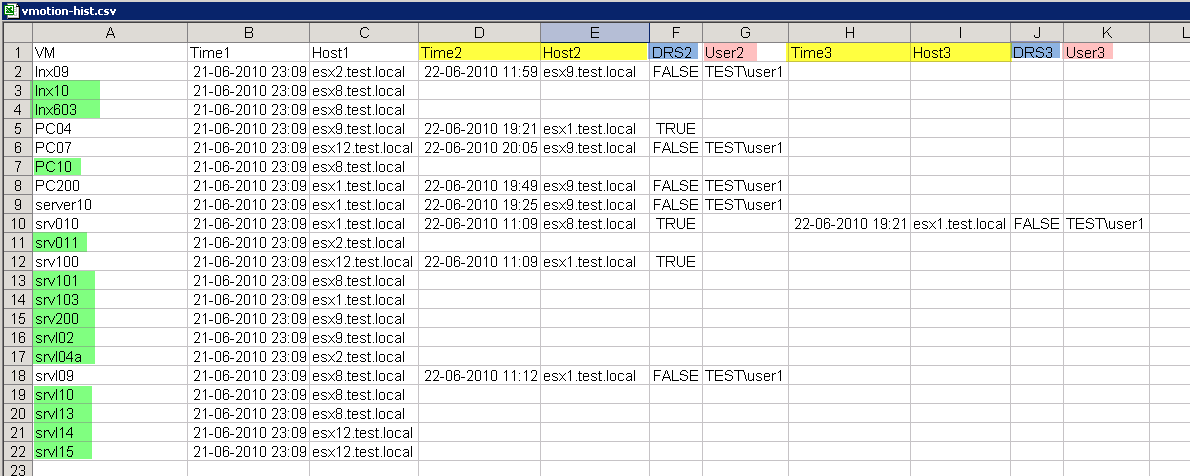
The script produces a CSV file that contains quite a bit of information.
A guest that was not vMotioned during the reporting interval will only have a Time1 and Host1 column.
Guests that were vMotioned will have additional Timen and Hostn columns. Notice the DRSn column which indicates if a vMotion was triggered by DRS or by a user. The Usern column will display the username if it was a user-invoked vMotion.
Stefan
Hello Luc,
Thanks for the script, unfortunately I am not able to run in. I always get this error message: “Get-Datacenter You are not currently connected to any servers. Please connect first using a Connect cmdlet.”
Even when putting a Connect-VIServer with the corresponding variables at the beginning of the script nothing changes. Any idea on how to solve this?
Kind regards
Stefan
LucD
Sorry to hear that.
It could mean that the Connect-VIServer fails.
Did you check that $global:DefaultVIServer shows the vSphere server you are connecting to?
You could try adding a Verbose switch to the Connect-VIServer cmdlet, which might provide more information.
Dmitriy
Hello!
I have a problem with outdata in csv:
The column HOST does not contain information about esxi hosts (Empty cells) in csv file. Other columns are contained.
Mohamed Elsaid
I have the same problem,, could you resolve it?
Mel
Thanks a lot for this script, it saved me a ton of time and it works great.
I do throw some errors that “Hosts” is deprecated and we should use “VMHosts” instead, but the script worked perfectly anyhow it just threw the warning.
Thanks again for the excellent script, I’ll be keeping this one on standby as my VCenter event log buffer runs out pretty fast in our environment.
LucD
Thanks.
You can get rid of those warnings by running
Set-PowerCLIConfiguration -DisplayDeprecationWarnings:$false
Ritam9
Hi Luc ,
Thanks for the script first. I need a small help. This script is working for me . However if i want to collect it for a particular VM , say “Test_VM”, how to fit that in the script. I have tried couple of things in the below line which are there in line 10-13. Could you give me an example. I am novice in powercli, could not make it running.
Below is the script part where I have tried to change but did not work —
[Line 10-13: We collect all the guests on which we want to report. This can be changed at will, just make sure the hash table $vmHash is populated.]
# Get the guest for which we want the report
$vmHash = @{}
Get-Datacenter -Name “MyDC” | Get-VM | %{
$vmHash[$_.Name] = $_.Host
}
LucD
You were nearly there.
The 1st change is lines 9-13. Change them to
$vmName = 'MyVM'

# Get the guest for which we want the report

$vmHash = @{}

Get-Datacenter -Name "MyDC" | Get-VM -Name $vmName| %{

$vmHash[$_.Name] = $_.Host

}
The 2nd part is lines 41-52. Those need to be replaced by
"VmBeingHotMigratedEvent" {

if($task.EntityName -eq $vmName){

$migrations += New-Object PSObject -Property @{

VMname = $task.EntityName

Source = $event.Host.Name

Destination = $event.DestHost.Name

Start = $task.StartTime

Finish = $task.CompleteTime

Result = $task.State

User = $task.Reason.UserName

DRS = &{if($task.DescriptionId -like "Drm.*"){$true}else{$false}}

}

}

}
I hope that works for you.
Dave
I’m new to powershell so bare with me but how do I get it to produce a csv file. I have executed the script and it completes successfully but doesn’t produce a file. Do I have to add something additional in?
LucD
Hi Dave,
If you ran the script literaly like it in the post, you should find a CSV file C:\vMotion-history.csv
Paul
Great script, my thanks. I note though that the vMotion times differ from the VI Client times and seem to be 11 hours behind the C# client’s log. Any reason for this?
admin
Hi Paul,
Thanks.
The times in the events are always in UTC, while in the VI CLient they are in your local timezone.
Could it be that your timezone is currently 11 hours behind UTC ?
Wu-Tang Dan
This post is awesome! I was able to show some of my application owners that their servers can be vMotioned for a future project by showing them how often they have moved in the past.
Thanks again.
Muhammad
Thx for this posting.
I wanted to ask if there is a built in report in web vCenter to get a report of bumber of vMotions in a DRS cluster or is custom powershell script the only way?
Thank you,
Muhammad
kze
Hi LucD,
Will it show vmotion history when the host is currently down? We are trying to determine where the vm gone after a host failure.
LucD
@kze, yes it will.
The events are gathered from the vCenter database. As long as the vCenter is there you should be able to get the events.
Gary Stephens
Great post — but I have a question. Could there be a bug in the script? I ran it as-is and got data for every VM. I changed the block on line 11-13 to this:
Get-Datacenter -Name “my.favorite.dc.name” | Get-VM | %{
where{$vmHash.ContainsKey($_.Name)
$vmHash[$_.Name] = $_.Host
}
}
This resulted in filtering the report to VMs that I initalized into @vmHash. I’m new to Powershell and VMWare, so I thought I’d check.
thanks again for the blog,
Gary
Kayser Soze
There is a DRS history tab on the VI Client – is it possible to create a script to export that info?
thanks.