
Lately I have been playing around with the new Storage related features in vSphere 5. One of the novelties is that you can now unmount a VMFS datastore and detach a SCSI LUN through the API.
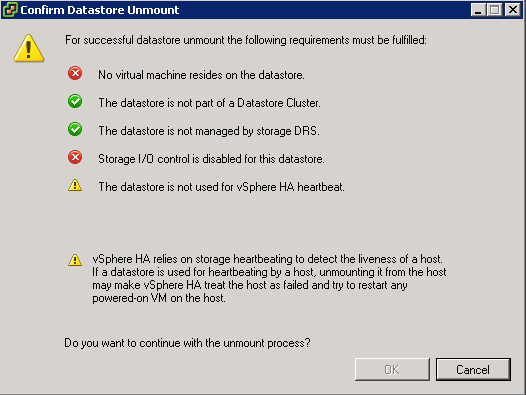
To be able to unmount a datastore, some conditions have to be met. In the vSphere Client you get an informative popup that tells what is prohibiting the datastore unmount. If not all conditions are met, you can not continue with the unmount.
Nice feature, but what for those of us that want to automate this ?
Update October 28th 2012: Take into account that the datastorecluster is not connected to a host that is part of a cluster. Skip the HA heartbeat test.
Update April 23th 2012: Use the RetrieveDasAdvancedRuntimeInfo method to find the actual datastores that are used for the heartbeat.
What to look for ?
From the popup, it is quite obvious what specific feature can prohibit the unmount of a datastore.
But if you look at Cormac’s post called What could be writing to a VMFS when no Virtual Machines are running?, there are a couple of other settings that might influence the ability to unmount a datastore.
In Cormac’s post you’ll find that a Distributed Virtual Switch configuration file or the presence of a scratch partition might also cause IO that would prevent a datastore unmount.
So I decided to expand the function with a check for those 2 additional causes.
The script
|
1 2 3 4 5 6 7 8 9 10 11 12 13 14 15 16 17 18 19 20 21 22 23 24 25 26 27 28 29 30 31 32 33 34 35 36 37 38 39 40 41 42 43 44 45 46 47 48 49 50 51 52 53 54 55 56 57 58 59 60 61 62 63 64 65 66 67 68 69 70 71 72 73 74 75 76 77 78 79 80 81 |
function Get-DatastoreUnmountStatus{ <# .SYNOPSIS Check if a datastore can be unmounted. .DESCRIPTION The function checks a number of prerequisites that need to be met to be able to unmount a datastore. .NOTES Author: Luc Dekens .PARAMETER Datastore The datastore for which you want to chekc the conditions. You can pass the name of the datastore or the Datastore object returned by Get-Datastore .EXAMPLE PS> Get-DatastoreUnmountStatus -Datastore DS1 .EXAMPLE PS> Get-Datastore | Get-DatastoreUnmountStatus #> param( [CmdletBinding()] [Parameter(Mandatory=$true,ValueFromPipeline=$true)] [PSObject[]]$Datastore ) process{ foreach($ds in $Datastore){ if($ds.GetType().Name -eq "string"){ $ds = Get-Datastore -Name $ds } $parent = Get-View $ds.ExtensionData.Parent New-Object PSObject -Property @{ Datastore = $ds.Name # No Virtual machines NoVM = $ds.ExtensionData.VM.Count -eq 0 # Not in a Datastore Cluster NoDastoreClusterMember = $parent -isnot [VMware.Vim.StoragePod] # Not managed by sDRS NosDRS = &{ if($parent -is [VMware.Vim.StoragePod]){ !$parent.PodStorageDrsEntry.StorageDrsConfig.PodConfig.Enabled } else {$true} } # SIOC disabled NoSIOC = !$ds.StorageIOControlEnabled # No HA heartbeat NoHAheartbeat = &{ $hbDatastores = @() $cls = Get-View -ViewType ClusterComputeResource -Property Host | where{$_.Host -contains $ds.ExtensionData.Host[0].Key} if($cls){ $cls | %{ ( $_.RetrieveDasAdvancedRuntimeInfo()).HeartbeatDatastoreInfo | %{ $hbDatastores += $_.Datastore } } $hbDatastores -notcontains $ds.ExtensionData.MoRef } else{$true} } # No vdSW file NovdSwFile = &{ New-PSDrive -Location $ds -Name ds -PSProvider VimDatastore -Root '\' | Out-Null $result = Get-ChildItem -Path ds:\ -Recurse | where {$_.Name -match '.dvsData'} Remove-PSDrive -Name ds -Confirm:$false if($result){$false}else{$true} } # No scratch partition NoScratchPartition = &{ $result = $true $ds.ExtensionData.Host | %{Get-View $_.Key} | %{ $diagSys = Get-View $_.ConfigManager.DiagnosticSystem $dsDisks = $ds.ExtensionData.Info.Vmfs.Extent | %{$_.DiskName} if($dsDisks -contains $diagSys.ActivePartition.Id.DiskName){ $result = $false } } $result } } } } } |
Annotations
Line 24-26: A simple Object By Name implementation. It allows to pass the datastores by name or by object to the function.
Line 27: The parent of the datastore is used in a couple of tests further on in the script
Line 31: Test if there are any VMs or Templates present on the datastore
Line 33: Test if the datastore belongs to a Storage Cluster
Line 35-40: Test if the datastore is managed by Storage DRS. The Enabled property in the StorageDrsPodConfigInfo object is used as the indicator.
Line 42: Test if SIOC is enabled for the datastore
Line 44-57: Test if the datastore is one of the Heartbeat Datastores. The test first gets all the clusters known in vCenter and then filters out those clusters that have hosts on which the datastore is visible.
Line 48,56: If the host is not part of a cluster, the HA heartbeat test is considered as successful.
Line 59-65: Test to see if the is a Distributed Virtual Switch configuration file present on the datastore.
Line 67-77: Test if the datastore is used as a scratch partition.
Sample usage
The function can be used in a stand-alone or in a pipeline construct.
|
1 |
Get-DatastoreUnmountStatus -Datastore DS1 |
The pipeline construct could look like this
|
1 |
Get-Datastore DS* | Get-DatastoreUnmountStatus |
The function produces 1 object per datastore. Each of the properties in the object represents 1 test that the function executes. Something like this.
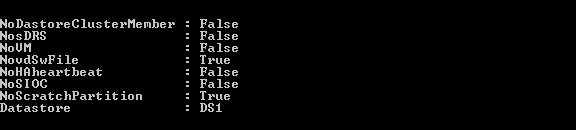
The output shows us that we will probably not be able to unmount datastore DS1, because:
- the datastore is part of a Datastore Cluster
- the datastore is managed by Storage DRS
- there are VMs (or Templates) on the datastore
- the datastore is used by the Datastore Heartbeat
- the datastore has SIOC enabled
The functions to solve this and allow an unmount of the datastore will follow in some future posts.
Enjoy !
Loïc
Hello,
Some comments…
1) The vdSW part doesn’t seem to be functional on ESXi 6 and 7. New-PSDrive works, but browsing the drive fails and Remove-PSDrive fails too. This is perhaps related to my environment (PowerShell on a remote server). It is possible to use SearchDatastore instead.
2) There is a problem with the ScratchPartition part : when on the same disk (which would likely be the boot disk of the ESXi) you have a ScratchPartition AND a datastore (on another partition), the result is false, because both partitions are located on the same disk. But this should not prevent you of unmounting the datastore. Unmounting would only be impossible if the Scratch is inside the datastore.
3) If I’m not wrong, $_.ConfigManager.DiagnosticSystem (BTW, this field seems to be empty on ESXi 7.*) is related to the dump partition (vmkDiagnostic), not to the Scratch configuration.
So the right way to check for ScratchPartition could be :
NoScratchPartition = &{
$result = $true
$ds.ExtensionData.Host | %{ $vmhost = Get-VMHost -Id $_.key
$scratch = (Get-AdvancedSetting -Entity $vmhost -Name ScratchConfig.CurrentScratchLocation).Value
if ($scratch -match $ds.ExtensionData.Info.Vmfs.Uuid) {
$result = $false
}
}
$result
}
5) Last thing, I’ve modified the PSObject creation in order to have the fields ordered as they are created.
Hope this helps.
Loïc
LucD
Thanks for the feedback.
daniel salud
Get-DatastoreUnmountStatus is not a recognizable command when I tried it on powercli. Is there a caveat to turn on that command? Sorry I am a rookie on powercli. We found some datastores that are not in used and we want to unmount them but make sure it is safe to unmount them. Help please ! Thank you
Andrew
Hi Luc,
If I’m not mistaken, the “$dsDisk -contains” line should read “$dsDisks -contains”.
I noticed I was getting some false negatives when no diagnostics partition existed. It appears this was effectively down to “$null -contains $null” returning true. Similarly this script would give false positives where a diagnostics partition was defined, as the non-null var would not be contained in the null var.
Regards,
Andrew
LucD
You are correct.
Thanks for catching that Andrew.
Justin Smith
Im using Matt’s answer from the following post:
https://communities.vmware.com/message/2408628#2408628
I can run his script but want to add something to it to have it check the unmount status prior to actually unmounting. I’ve poked around with the Get-DatastoreUnmountStatus command but cant seem to get it. Is there something I can do that will have it reference the .txt file with a list of datastores that need to be unmounted, then run the unmount command. I can even do 2 seperate scripts if its easier. A status check, then the unmount command.
Gui
Hi Luc,
Awesome script. We are already using it to check we can remove datastores from our environment on daily basis.
Thanks for that work..
We are also trying to do same verifications for devices specially for RDM that are being decommissioned.
Could you advise what command I need to run to test device unmounts?
Thanks
LucD
Thanks Gui.
To chekc if a LUN is unmounted I would check the ScsiLunState of the device.
You can get to that state from the HostStorageSystem, and then drill down via storageDeviceInfo.scsiLun . Once there you can find the LUN you are after by comparing the CanonicalName.
Does that help ?
Gnat
Now, for the output…
It appears that the output from the script is a hash table, but I cannot actually get the data using (what I believe to be) standard commands for retrieving data from a hash table (but I am not an expert). I would like to be able to take the output from the script and format it in such a way that I can, via the script, prevent the user from going forward with the unmount if the check fails in certain parts.
If($NoDastoreClusterMember -eq “True”){functionx}
ElseIf($NosDRS -eq “True”){functiony}
etc…
I have been hacking away at this for several hours now, but am not getting anywhere, any help?
LucD
@Gnat, the function returns an object with a number of properties.
You can use them as follows in a script.
$result = Get-DatastoreUnmountStatus -Datastore DS1
If($result.NoDastoreClusterMember){functionx}
ElseIf($result.NosDRS){functiony}
As you can see you can access the individual properties in a standard PowerShell way.
Btw, in the conditions you can just refer to the property since each of these properties is a Boolean.
Gnat
@LucD
That did the trick.
Thanks for your quick response and great work.
Gnat
@LucD
Most of the time, the datastore is connected to a cluster, however, we have a single host that we can use for recovery of a VM or filesystem from a snapshot. Is there a way that I can suppress the error when it is a single host?
LucD
@Gnat, I updated the function to take this into account. Give it another try.
Thanks for discovering this shortcoming of the function.
Gnat
I am having trouble with this function. I have integrated it into a multi-functional script, which will do, among other things, unmount and detach datastores/volumes from a host or set of host. This is a great function that will allow me to confirm that the datastore can be unmounted, but when I run it, I am receiving the following error:
You cannot call a method on a null-valued expression.
At E:\Systems\PowerShell\VMUnmountDS.ps1:49 char:41
+ ($_.RetrieveDasAdvancedRuntimeInfo <<<< ()).HeartbeatDatastoreInfo | %{
+ CategoryInfo : InvalidOperation: (RetrieveDasAdvancedRuntimeInfo:String) [], RuntimeException
+ FullyQualifiedErrorId : InvokeMethodOnNull
I am invoking the function and passing the datastore name via a variable. Can you possibly shine some light on why this is failing?
Here is the rest of my code:
$gethosts = Get-VMHost
Write-Host "You have chosen to Unmount a datastore from a single host." -foregroundcolor "yellow"
Write-Host "Please select a host from the list below:" -foregroundcolor "yellow"
Write-Host ""
foreach($gethost in $gethosts)
{
Write-Host $gethost -foregroundcolor "white"
}
Write-Host ""
Write-Host -NoNewline "Please type the name of the host to unmount the datastore from, 'GB' to go back to the Functions Menu or 'Q' to quit: " -foregroundcolor "cyan" ; $hostchoice = Read-Host
$hostchoice = $hostchoice.ToUpper()
Write-Host ""
$getdatastores = Get-Datastore -VMHost $hostchoice
foreach
($getdatastore in $getdatastores)
{
Write-Host $getdatastore -foregroundcolor "white"
}
Write-Host ""
Write-Host -NoNewline "Please type the name of the datastore to unmount from the host, 'GB' to go back to the Functions Menu or 'Q' to quit: " -foregroundcolor "cyan" ; $datastorechoice = Read-Host
$datastorechoice = $datastorechoice.ToUpper()
Write-Host ""
Write-Host $hostchoice
Write-Host $datastorechoice
Write-Host ""
Write-Host "Verifying the Unmount status of the datastore ($datastorechoice) on host ($hostchoice)"
Get-DatastoreUnmountStatus -Datastore $datastorechoice
LucD
@Gnat, is the datastorecluster connected to ESXi hosts that form a cluster ?
The function doesn’t take into account that the datastorecluster is connected to a standalone ESXi host.
In that part of the code I’m in fact testing if the datastore is used for a HA heartbeat. Of course, if there is no cluster, there will not be a HA heartbeat.
I’ll have to update the function to take standalone ESXi servers into account.
Ivanzito
The script is bad. The is necesary a “(” in line 08
LucD
@Ivanzito, it seems some lines got lost of the code.
It should be ok now.
Harold
Hi Luc,
you’re welcome
And I have learned once again from you, now on the RetrieveDasAdvancedRuntimeInfo method.
Thanks!
Harold
Hi Luc,
If I am correct, the NoHAheartbeat will only be set to False if you have manually preferred Heartbeat Datastores (as listed in the Cluster Status view)
If I have no preferred datastores selected, the script will mark NoHAheartbeat as True, even if they are actually being reported as in use (in the Cluster Status view) by the GUI when unmounting.
Do you know how to detect the non-preferred, but in use, heartbeat datastores?
In the mean time I am looking for this as well.
Regards,
@hharold
LucD
@Harold, you’re right, the property I was using to find the haertbeat datastores is only filled in when you explicitely specify the heartbeat datastores.
I have updated the function and it now uses the RetrieveDasAdvancedRuntimeInfo method to find the haertbeat datastores.
Thanks for finding this bug.