
One of the exciting new dvSwitch features in vSphere 5.1 is the ability to export and restore a dvSwitch configuration. This new feature is only available through the vSphere Web Client.
On Hypervisor.fr, a blog you should have in your RSS reader, there were already posts on how to configure the dvSwitch healthcheck and how to do a dvSwitch configuration rollback from PowerCLI. But till now, as far as I know, there were no functions to provide the dvSwitch export/restore functionality.
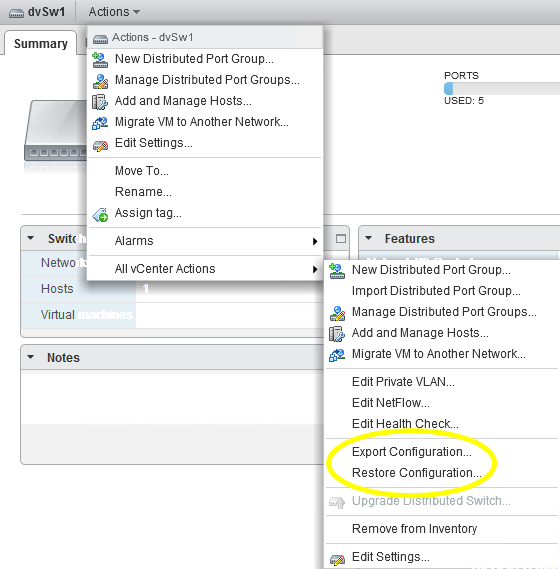
Time to make this useful functionality available for the “PowerCLI automation crowd” 😉
The Script
|
1 2 3 4 5 6 7 8 9 10 11 12 13 14 15 16 17 18 19 20 21 22 23 24 25 26 27 28 29 30 31 32 33 34 35 36 37 38 39 40 41 42 43 44 45 46 47 48 49 50 51 52 53 54 55 56 57 58 59 60 61 62 63 64 65 66 67 68 69 70 71 72 73 74 75 76 77 78 79 80 81 82 83 84 85 86 87 88 89 90 91 92 93 94 95 96 97 98 99 100 |
function Export-dvSwConfig { <# .SYNOPSIS Export a dvSwitch configuration .DESCRIPTION The function will export the dvSwitch configuration(s) to a file. This requires at least vSphere 5.1. .NOTES Author: Luc Dekens .PARAMETER dvSw The dvSwitch(es) whose config you want to export. .PARAMETER Path The path to a filename where the config should be written to. .PARAMETER IncludePortgroups Switch that indicates if only the dvSwitch configuration or the dvSwitch and all portgroups should be exported .EXAMPLE PS> Export-dvSwConfig -Path C:\dvswconfig.xml -IncludePortgroups .EXAMPLE PS> $dvsw | Export-dvSwConfig -Path C:\file.xml #> param( [CmdletBinding()] [Parameter(Mandatory=$true,ValueFromPipeline=$true)] [PSObject]$dvSw, [String]$Path, [Switch]$IncludePortgroups = $false ) begin { $si = Get-View ServiceInstance $dvSwMgr = Get-View $si.Content.dvSwitchManager $selectionTab = @() } process{ if($dvSw -is [System.String]){ $dvSw = Get-VirtualSwitch -Distributed -Name $dvsw } if($IncludePortgroups){ $selection = New-Object VMware.Vim.DVPortgroupSelection $selection.portgroupKey = Get-VirtualPortGroup -VirtualSwitch $dvsw | %{$_.Key} $selection.dvsUuid = $dvsw.ExtensionData.Uuid $selectionTab += $selection } $selection = New-Object VMware.Vim.DVSSelection $selection.dvsUuid = $dvsw.ExtensionData.Uuid $selectionTab += $selection } end{ $dvswSaved = $dvSwMgr.DVSManagerExportEntity($selectionTab) $dvswSaved | Export-Clixml -Path $Path } } function Restore-dvSwConfig { <# .SYNOPSIS Restores a dvSwitch configuration .DESCRIPTION The function will import the dvSwitch configuration(s) from a file. This requires at least vSphere 5.1. .NOTES Author: Luc Dekens .PARAMETER Path The path to a filename where the config is stored. .PARAMETER IncludePortgroups Switch that indicates if only the dvSwitch configuration or the dvSwitch and all portgroups should be exported .EXAMPLE PS> Restore-dvSwConfig -Path C:\dvswconfig.xml #> param( [CmdletBinding()] [Parameter(Mandatory=$true)] [String]$Path, [Switch]$IncludePortgroups = $false ) process { $si = Get-View ServiceInstance $dvSwMgr = Get-View $si.Content.dvSwitchManager $dvswImport = @() Import-Clixml -Path $Path | where{($IncludePortgroups -and $_.EntityType -eq "distributedVirtualPortgroup") -or $_.EntityType -eq "distributedVirtualSwitch"} | %{ $info = New-Object VMware.Vim.EntityBackupConfig $info.ConfigBlob = $_.ConfigBlob $info.ConfigVersion = $_.ConfigVersion $info.Container = $_.Container $info.EntityType = $_.EntityType $info.Key = $_.Key $info.Name = $_.Name $dvswImport += $info } $dvSwMgr.DVSManagerImportEntity($dvswImport,"applyToEntitySpecified") | Out-Null } } |
Annotations
Line 25,37-39: My cheap way of emulating the OBN principle.
Line 40-45: If the IncludePortgroups switch is $true, the configuration of the distributed virtual portgroups on the dvSwitch will also be exported.
Line 53: The object that is returned by the call to the DVSManagerExportEntity method is written to a file with the Export-Clixml cmdlet.
Line 90-95: The reason why the function copies the properties one-by-one instead of doing the complete object in one go is due to serialisation-deserialisation process that you get with the Export- and Import-Clixml cmdlets. The imported objects all have a type that has a Deserialized suffix in front. There are ways to avoid this, but the is a simple and readable solution.
Sample Usage
The use of the functions is quite simple.
|
1 2 |
$dvSw = Get-VirtualSwitch -Distributed -Name dvSw1 Export-dvSwConfig -dvSw $dvSw -Path C:\dvSw1.xml |
By default this will save the configuration of the dvSwitch, but not the portgroups on the dvSwitch.
To include the portgroups, you will have to use the IncludePortgroups switch.
|
1 2 |
$dvSw = Get-VirtualSwitch -Distributed -Name dvSw1 Export-dvSwConfig -dvSw $dvSw -Path C:\dvSw1.xml -IncludePortgroups |
You can also use the function in a pipeline like this
|
1 |
Get-VirtualSwitch -Distributed -Name dvSw2 | Export-dvSwConfig -Path C:\dvSw2.xm2 |
As you can read in the Annotations, the function uses the PowerShell Export-Clixml cmdlet to write the configuration to a file.
Note that this format is NOT COMPATIBLE with the file format used in the vSphere Web Client.
If you want to emulate that format, you have a look at William Lam‘s post Automate Backups of VDS & Distributed Portgroup Configurations in vSphere 5.1.
To restore the configuration of a dvSwitch, and optionally the connected portgroups, is quite similar. A restore can be executed like this.
|
1 |
Restore-dvSwConfig -Path C:\dvsw1.xml -IncludePortgroups |
Notice that the IncludePortgroups switch defines if you want to restore the configuration of the portgroups on the dvSwitch as well.
The 2 methods that are used by these functions have several other possibilities. You can for example also use these files to Import a dvSwitch, but that will be for a later post 😉
Enjoy !
mb
Same problem as previous commenter.
Could we get a updated working version as the web client export/import does not have the ability to actually recreate the entire dvswitch with the same key id, which means it’s useless when trying to restore on a different vcenter server than the export was used on.
Marc
hi Luc.
I try to import export the config from a DVSwitch in one vCenter to another vcenter.
The Export seems correct.
When I try to import in the other vcenter i lose access to the vcenter (the vcenter client stops) with the command:
Restore-dvSwConfig -Path ConfigExported.xml -IncludePortgroups
and I get:
Exception calling “DVSManagerImportEntity” with “2” argument(s): “Unable to connect to the remote server”
At line:38 char:5
+ $dvSwMgr.DVSManagerImportEntity($dvswImport,”applyToEntitySpecified”) | Out- …
+ ~~~~~~~~~~~~~~~~~~~~~~~~~~~~~~~~~~~~~~~~~~~~~~~~~~~~~~~~~~~~~~~~~~~~~~~~~~~~
+ CategoryInfo : NotSpecified: (:) [], MethodInvocationException
+ FullyQualifiedErrorId : WebException
And nothing changed when I log back.
any idea?
I tried with no Dvswitch in the new vc. I tried with a DVswitch of the same name and same DVSwitch-uplink-number…