Archive

Archive for the ‘New-VIProperty’ Category

Folder by Path

May 18th, 2012 14 comments

There seem to be many vSphere environments where the same foldername is used multiple times. A blue folder with the name Servers is quite common for example.
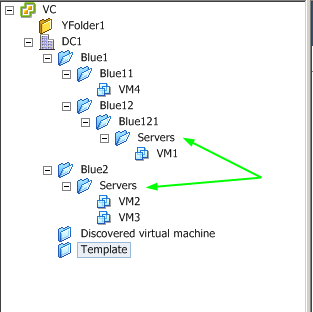
If you need to retrieve such a folder with the Get-Folder cmdlet, you will have to walk the path to the folder leaf by leaf and use the Location parameter. It would be handier if you could just specify the path to the folder and retrieve the folder like that.

The following is a small function that will allow you to do just that.

Read more…

Variations on a port

January 29th, 2012 2 comments

I got an interesting question from one of my co-authors of the PowerCLI Reference book. He was looking for a method to find the port used by a VM when connected to a portgroup on a dvSwitch.

Finding the answer to that question is not too difficult, once you know which property holds the value. But while writing and testing the script, I thought that this question would be a good opportunity to show several ways and methods that you have at your disposal in PowerCLI and PowerShell, to come to a solution.

Here it goes.

Read more…

VIProperties in a Module

August 17th, 2011 11 comments

Judging from the number of hits, the VIProperties page seems to be rather popular.
The number of entries on that page increases nearly on a daily basis.And judging by the list of people who submitted New-VIProperty entries, this particular feature of PowerCLI is in use all over the place.
Recently my co-author of the PowerCLI book, Jonathan Medd, had a brilliant idea.

Why not bundle all the VIProperties in a module ? The user would just have to do an Import-Module, instead of a copy/paste on each of the entries.

So for the 100th post on my blog I decided to bring you the VIProperty module.

Update August 25th 2011: added the use of the PowerCLI 5 Get-VIProperty cmdlet.

Read more…

The making of a New-VIProperty called lunID

July 26th, 2011 12 comments

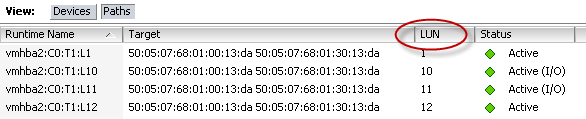
An interesting question arrived in my mailbox this morning. Robert wanted to know what was the most efficient way to create a new property, called lunID,  for the objects returned by the Get-ScsiLun cmdlet.

The new property had to show the lunID, as it is returned in the LUN column in the vSphere client.

Read more…

Runtime Name via Extensiondata and New-VIProperty

October 17th, 2010 10 comments

One of the demos we did in our VMworld 2010 US and Europe sessions, showed the use of the new Extensiondata property and of the new New-VIProperty cmdlet. Both features were introduced with PowerCLI 4.1. In my PowerCLI 4.1 brings the New-VIProperty cmdlet post I already showed the interesting possibilities this new cmdlet offers.

On my return from VMworld Europe there was a new thread in the PowerCLI Community that asked how one could get at the Runtime Name property as it is shown in the vSphere Client. The Get-ScsiLun and Get-ScsiLunPath cmdlets unfortunately do not return that property. So I guessed it was time to show once more the strength of the New-VIProperty cmdlet.

Read more…

On parents and nested properties

August 1st, 2010 2 comments

In a recent post on the vSphere PowerCLI Blog, called New Nested Properties for Navigating to Parent Objects in PowerCLI 4.1, some new features were introduced.

In PowerCLI 4.1 some objects now have, besides the ParentId property, the actual parent object itself. This will take quite some complexity out of several scripts. This is definitely a good improvement.

The 2nd novelty in that post were nested properties. Some SDK object properties are now mapped directly in the PowerCLI object. For example the VMHost object now holds the StorageInfo and NetworkInfo properties besides some others. And what is even better, there is hardly any performance impact since the values will only be loaded the first time you access the properties (similar to the ExtensionData property).

Read more…