Archive

Archive for the ‘datastore’ Category

Remove old VM monitor dump files

April 1st, 2013 No comments

When you need to move the content of one or more datastores, you sometimes stumble upon files that you didn’t know where there. One such type of files are dump files that are stored in a VM’s directory on the datastore.

The files I encountered were named like this:

  • vmware64-core*.gz
  • vmware-vmx-zdump.*

There isn’t a lot of information available on what exactly these files are used for, besides that they seem to be created when the VM Monitor encounters a crash or a serious problem.

Since these files were quite old, and since I didn’t have any open tickets with VMware, I decided to remove these files. But of course in the PowerCLI way with a function ;-)

Read more…

Categories: datastore, dump, Folder Tags: , ,

Find free SCSI LUNs

January 15th, 2013 2 comments

Another post that comes from a VMTN PowerCLI Community question. Jeff wanted to find the free SCSI LUNs in his environment.
While answering that thread I was amazed there was no PowerCLI function written yet to provide this functionality. At least that was what my friend Google told me ;-)

Since there exists a SDK method that makes retrieving free SCSI LUNs quite easy, the function I came up with isn’t too complex.

But it should help you in further automating the setup of your datastores.

Read more…

Categories: datastore, LUN, PowerShell Tags: , ,

Monitor the size of your vDisks

December 2nd, 2012 No comments

In a recent thread on the VMTN PowerCLI Community someone asked if it is possible to get historical hard disk statistics. I referred the user to my Datastore usage statistics post, where I showed how to use the “disk” metrics to get that information.

But getting the individual vDisk statistics is a bit more tricky compared to getting the datastore statistics, as I showed in that post. The “disk” metrics hold the information, but the Instance that points to the MoRef value of a VM makes it a bit more tricky to retrieve.

Be forewarned, the “disk” metrics hold usage data for all the vDisks that a specific VM has on a specific datastore. You will not be able to get individual vDisk statistics, unless the vDisks are stored on different datastores !

On the positive side, the “disk” metrics will allow you to see how your vDisks increase in size over time. For your Thick vDisks that increase will be by expanding them, and for your Thin vDisks it will also show the natural growth.

Read more…

Test if the datastore can be unmounted

April 15th, 2012 12 comments

Lately I have been playing around with the new Storage related features in vSphere 5. One of the novelties is that you can now unmount a VMFS datastore and detach a SCSI LUN through the API.
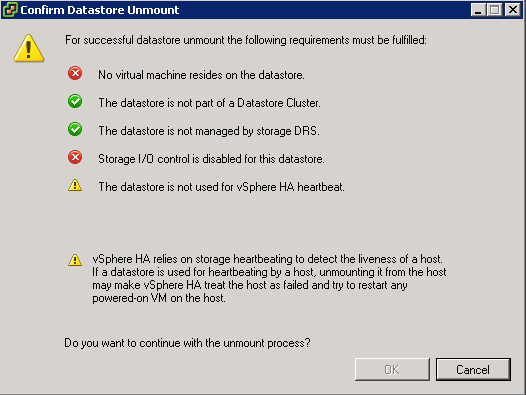
To be able to unmount a datastore, some conditions have to be met. In the vSphere Client you get an informative popup that tells what is prohibiting the datastore unmount. If not all conditions are met, you can not continue with the unmount.

Nice feature, but what for those of us that want to automate this ?

Update October 28th 2012: Take into account that the datastorecluster is not connected to a host that is part of a cluster. Skip the HA heartbeat test.

Update April 23th 2012: Use the RetrieveDasAdvancedRuntimeInfo method to find the actual datastores that are used for the heartbeat.

Read more…

vSphere 5 Top 10 – VMFS5

December 19th, 2011 4 comments

Continuing my Dutch VMUG Event 2011 presentation series with a post on the VMFS5 feature. This feature clocked in at position 8 in the Top 10.

With VMFS5 comes a bunch of new features. Just to name a few:

  • 64TB VMFS Volumes in 1 extent
  • 64TB physical RDM
  • Unified block size of 1MB
  • Support for more files (> 100000)

For a complete list of the features that VMFS5 introduces, have a look at Cormac‘s post, called vSphere 5.0 Storage Features Part 1 – VMFS-5.

Read more…

vSphere 5 Top 10 – HA

December 13th, 2011 4 comments

The second post originating from our presentation at the Dutch VMUG Event 2011 is about HA. vSphere High Availability appeared in the 2nd place of the vSphere 5 features Top 10. For the HA feature we showed how you could find out the FDM master and slaves in your cluster, and how to find the heartbeat datastore.

Read more…

Storage Views – Datastores

November 14th, 2011 9 comments

In the vCenter Client, since vSphere 4, you can find a Storage Views tab on several of the VI containers. The data in these Storage Views is collected and provided by the vCenter Storage Monitoring plug-in.

Have a look at David Davis‘s post, called Using VMware vSphere Storage Views, for more information on what you can do with the Storage Views.

Some time ago I got a question from Andrew how the Multipathing Status presented in the Storage Views could be detected and reported upon by a PowerCLI script. What looked rather simple at first, turned out to be a bit more difficult than I anticipated.

Read more…

Datastore usage statistics

June 19th, 2011 19 comments

An interesting question came up in the PowerCLI Community. Can one extract the datastore statistics, that are used for the space utilization graphs in the vSphere Client, with PowerCLI ? The graph in question, which you find in the Datastores Inventory view under the Performance tab, looks something like this.

Read more…

Orphaned files and folders – Spring cleaning

April 25th, 2011 52 comments

In our PowerCLI book we presented a Delete-Harddisk function in Chapter 7.

One of our readers asked if that function could be used to remove orphaned VMDK files from one or more datastores. Now unfortunately that is not the case since the function we presented in chapter 7 uses the ReconfigVM_Task method to remove the harddisk.

In the PowerCLI Community there are some thread that provide scripts to report on orphaned VMDK files, but most of these are quite old.

So I decided to write a new script that would report on orphaned folders and VMDK files and that would have an option to remove these folders and files.

Read more…

SIOC statistics

January 24th, 2011 4 comments

SIOC (Storage IO Control) is apparently a hot topic. There have been an important number of posts since it was made available with vSphere 4.1. On this blog, in my Automate SIOC post, you can find functions to verify and activate/deactivate SIOC from your PowerShell script.

A recent post on Yellow-Bricks, called Enable Storage IO Control on all Datastores! got quite a few comments and Tweets.

I was intrigued by one of the comments on Twitter that stated that the users didn’t understand what SIOC was all about. From several posts on SIOC I came to understand that the non-VI workload event would be fired when SIOC doesn’t see any latency improvements when it throttles the storage queue. Simple enough, but is there any data available that can make this visible ?

Read more…