
The previous parts (Part1, Part2 & Part 3) in the dvSwitch series showed how to create a dvSwitch, a portgroup for Virtual Machines and a Service Console & vmKernle portgroup. The test setup now looks something like this:
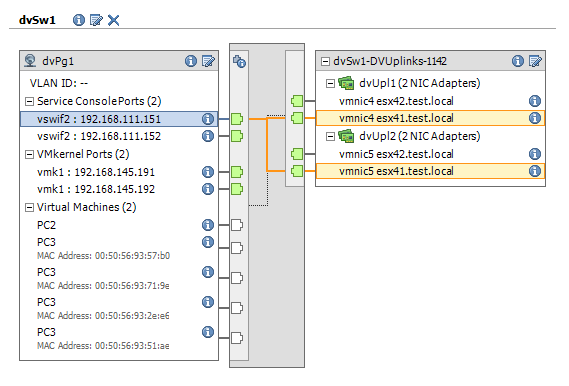 The double Service Consoles and vmKernel connection might look confusing at first. But when you select one these connections, the vSphere client will show you to which uplink a specific connection is going.
To increase the availability of the dvSwitch, I will show how to add two pNics and how to activate and configure NIC Teaming.
When I created the dvSwitch I configured it for two uplink ports (per host). Since I’m adding two pNics, I will first have to change the maximum number of dvUplink ports.
|
1 2 3 4 5 6 7 8 9 10 11 12 13 14 15 16 17 18 19 20 21 22 23 24 25 26 27 28 29 30 31 32 33 34 35 36 37 38 39 40 41 42 43 44 45 46 47 48 49 50 51 52 |
function Get-dvSwitch{ param($dcName,$dvSwName) $dcNetFolder = Get-View (Get-Datacenter $dcName | Get-View).NetworkFolder $found = $null foreach($net in $dcNetFolder.ChildEntity){ if($net.Type -eq "VmwareDistributedVirtualSwitch"){ $temp = Get-View $net if($temp.Name -eq $dvSwName){ $found = $temp } } } $found } function Set-dvSwUplink{ param($dcName, $dvSwName, $baseUplink, $nrUplink) $dvSw = Get-dvSwitch $dcName $dvSwitchName $currentnrUplink = $dvSw.Config.UplinkPortPolicy.UplinkPortName.Count if($nrUplink -ne $currentnrUplink){ $spec = New-Object VMware.Vim.DVSConfigSpec $spec.configVersion = $dvSw.Config.ConfigVersion $spec.uplinkPortPolicy = New-Object VMware.Vim.DVSNameArrayUplinkPortPolicy for($i = 1; $i -le $nrUplink; $i++){ $spec.uplinkPortPolicy.uplinkPortName += ($baseUplink + $i) } $taskMoRef = $dvSw.ReconfigureDvs_Task($spec) $task = Get-View $taskMoRef while("running","queued" -contains $task.Info.State){ $task.UpdateViewData("Info") } $task.Info.Result } else{ $null } } $datacenterName = "Home1" $dvSwitchName = "dvSw1" $baseUplink = "dvUpl" $nrUplinkNew = 4 $dvPgName = "dvPg1" $dvSw = Get-dvSwitch $datacenterName $dvSwitchName Set-dvSwUplink $datacenterName $dvSw $baseUplink $nrUplinkNew |
Annotation:
Line 23-29: simple algorithm to increase (or decrease) the number of Uplink ports on a dvSwitch.
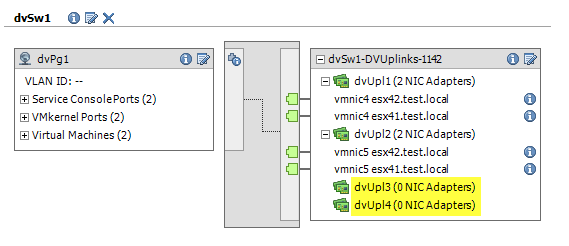
There are now two free uplink ports available in the dvSwitch. The next step is to add two pNics to the dvSwitch. This has to be done on each host that is connected to the dvSwitch. I use the UpdateNetworkConfig method to accomplish this.
|
1 2 3 4 5 6 7 8 9 10 11 12 13 14 15 16 17 18 19 20 21 22 23 24 25 26 27 28 29 30 31 32 33 34 35 36 37 38 39 40 41 42 43 44 45 46 |
function Add-dvSwHostpNic{ param ($dvSw, $pnics) $dvSw.Config.Host | % {Get-View $_.Config.Host} | where {$_.Runtime.ConnectionState -eq "connected"} | % { $hostNetSys = Get-View (Get-View $_.Config.Host).configManager.networkSystem $spec = New-Object VMware.Vim.HostNetworkConfig $pSwitch = New-Object VMware.Vim.HostProxySwitchConfig $pSwitch.changeOperation = "edit" $pSwitch.spec = New-Object VMware.Vim.HostProxySwitchSpec $pSwitch.spec.backing = New-Object VMware.Vim.DistributedVirtualSwitchHostMemberPnicBacking # Get available Uplinks $hostNetSys.NetworkInfo.ProxySwitch | where {$_.DvsName -eq $dvSw.Name} | % { $configuredUplinks = @{} $_.UplinkPort | % {$configuredUplinks[$_.Key] = $_.Value} $_.Spec.Backing.PnicSpec | % { $configuredUplinks.Remove($_.UplinkPortKey) $pSwitch.spec.backing.pnicSpec += $_ } } # Assign the free uplinks to the new pNics $i = 0 $keysUplinks = $configuredUplinks.Keys | Sort-Object $pnics | % { $pnic = New-Object VMware.Vim.DistributedVirtualSwitchHostMemberPnicSpec $pnic.pnicDevice = $_ $pnic.UplinkPortKey = $keysUplinks[$i] $i++ $pSwitch.spec.backing.pnicSpec += $pnic } $pSwitch.uuid = $dvSw.Config.Uuid $spec.ProxySwitch = $pSwitch $result = $hostNetSys.UpdateNetworkConfig($spec, "modify") } } $datacenterName = "Home1" $dvSwitchName = "dvSw1" $baseUplink = "dvUpl" $nrUplinkNew = 4 $dvPgName = "dvPg1" Add-dvSwHostpNic $dvSw ("vmnic6","vmnic7") |
Anotation:
Line 4: I filter out the hosts that are not connected to avoid error messages from the UpdateNetworkConfig method
Line 16: the available uplinks are placed in a hash table.
Line 18: the uplinks that are in use are removed from the hash table
Line 24: the remaining uplinks, which be definition are free, are used to assign to the new pNICs
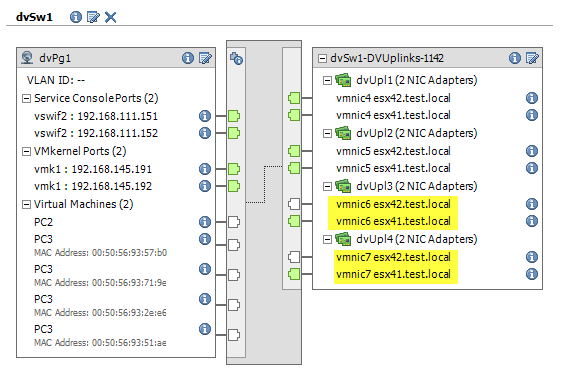
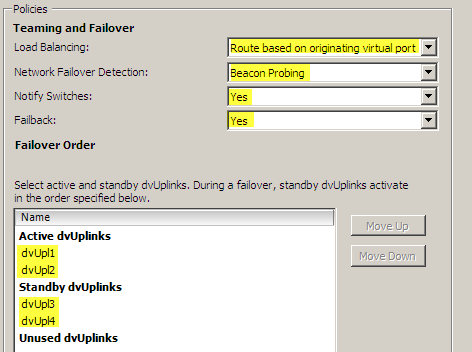
All the required elements are now in place to set up Nic Teaming. In this case I will keep the two original pNics as the Active Nics and define the two new pNics as Standby Nics. As a failover criteria I will use beacon probing in this example.
|
1 2 3 4 5 6 7 8 9 10 11 12 13 14 15 16 17 18 19 20 21 22 23 24 25 26 27 28 29 30 31 32 33 34 35 36 37 38 39 40 41 42 43 44 |
function Set-dVSwPgTeam{ param($dvSw, $dvPgName, $actUpl, $sbyUpl) # Find the portgroup $dvSw.Portgroup | %{ $dvPgTemp = Get-View -Id $_ if($dvPgTemp.Name -eq $dvPgName){ $dvPg = $dvPgTemp } } $spec = New-Object VMware.Vim.DVPortgroupConfigSpec $spec.configVersion = $dvPg.Config.ConfigVersion $spec.defaultPortConfig = New-Object VMware.Vim.VMwareDVSPortSetting $spec.defaultPortConfig.uplinkTeamingPolicy = New-Object VMware.Vim.VmwareUplinkPortTeamingPolicy $spec.defaultPortConfig.uplinkTeamingPolicy.failureCriteria = New-Object VMware.Vim.DVSFailureCriteria $spec.defaultPortConfig.uplinkTeamingPolicy.failureCriteria.checkBeacon = New-Object VMware.Vim.BoolPolicy $spec.defaultPortConfig.uplinkTeamingPolicy.failureCriteria.checkBeacon.value = $true $spec.defaultPortConfig.uplinkTeamingPolicy.notifySwitches = New-Object VMware.Vim.BoolPolicy $spec.defaultPortConfig.uplinkTeamingPolicy.notifySwitches.value = $true $spec.defaultPortConfig.uplinkTeamingPolicy.policy = New-Object VMware.Vim.StringPolicy $spec.defaultPortConfig.uplinkTeamingPolicy.policy.value = "loadbalance_srcid" $spec.defaultPortConfig.uplinkTeamingPolicy.reversePolicy = New-Object VMware.Vim.BoolPolicy $spec.defaultPortConfig.uplinkTeamingPolicy.rollingOrder = New-Object VMware.Vim.BoolPolicy $spec.defaultPortConfig.uplinkTeamingPolicy.rollingOrder.value = $false $spec.defaultPortConfig.uplinkTeamingPolicy.uplinkPortOrder = New-Object VMware.Vim.VMwareUplinkPortOrderPolicy $spec.defaultPortConfig.uplinkTeamingPolicy.uplinkPortOrder.activeUplinkPort = $actUpl $spec.defaultPortConfig.uplinkTeamingPolicy.uplinkPortOrder.standbyUplinkPort = $sbyUpl $taskMoRef = $dvPg.ReconfigureDVPortgroup_Task($spec) $task = Get-View $taskMoRef while("running","queued" -contains $task.Info.State){ $task.UpdateViewData("Info") } } $datacenterName = "Home1" $dvSwitchName = "dvSw1" $baseUplink = "dvUpl" $nrUplinkNew = 4 $dvPgName = "dvPg1" Set-dvSwPgTeam $dvSw $dvPgName ("dvUpl1","dvUpl2") ("dvUpl3","dvUpl4") |
Annotation:
Line13: you need to pass the current configversion to the method otherwise the method will fail
This is how the targeted setup ultimately looks like in the vCenter client.
Sven
@Sven
Okay, I think i finally made it.
I just didn’t realized, that the physical NICs had to be free before i can connect them.
So I had to remove them from the VSS before connectim them to the dvSwitch.
I removed all NICs from all VSS with the following line.
$vmhostview.config.network.vswitch | %{ Get-Virtualswitch -ID $_.key -VMHost $vmhost | Set-VirtualSwitch -Nic @() -Confirm:$false | Out-Null}
Sven
Hi,
At first I really want to thank you for your work on the DVSwitch functions, which were really helpfully for my work.
At the Moment I am working on a longer script, which will automate our whole ESXi Configuration.
Therefore I used some of your functions and edited them to my needs.
For now I have written a huge function which joins the new Host to the DVswitch.
It consists of the following steps:
-Check for NICs which can be connected to the dVSwitch without loosing connection
-Connect them to the dvSwitch
-Migrate the Management vmk Adapter to the appropriat PortGroup on the dvSwitch
-Migrate all other existing vmKs
-Migrate all VMs
-Now add the NICs connected to the VSS to the dvSwitch
The last step, it is, that I can’t get to manage..
I’ve copied your Add-dvSwHostpNic function and changed some little things..
But when I call it I alway get “A parameter specified was not correct”
This is how my function looks like:
function Add-dvSwHostpNic{
param ($dvSw,$vmhost, $pnics)
$dvSw.UpdateviewData()
#changed this to support VMware.Vim.PhysicalNic Objects
if(($pnics | ? {$_.Device})){$pnics = $pnics | % {$_.Device}}
#changed this to connect only the choosen hosts nics
$dvSw.Config.Host | Where {(Get-VMHost -ID $_.Config.Host).Name -eq $vmhost} | % {
$hostNetSys = Get-View (Get-View $_.Config.Host).configManager.networkSystem
$spec = New-Object VMware.Vim.HostNetworkConfig
$pSwitch = New-Object VMware.Vim.HostProxySwitchConfig
$pSwitch.changeOperation = “edit”
$pSwitch.spec = New-Object VMware.Vim.HostProxySwitchSpec
$pSwitch.spec.backing = New-Object VMware.Vim.DistributedVirtualSwitchHostMemberPnicBacking
# Get available Uplinks
$hostNetSys.NetworkInfo.ProxySwitch | where {$_.DvsName -eq $dvSw.Name} | % {
$configuredUplinks = @{}
$_.UplinkPort | % {$configuredUplinks[$_.Key] = $_.Value}
$_.Spec.Backing.PnicSpec | % {
$configuredUplinks.Remove($_.UplinkPortKey)
$pSwitch.spec.backing.pnicSpec += $_
}
}
# Assign the free uplinks to the new pNics
$i = 0
#important to be an array
$keysUplinks = [System.Array]($configuredUplinks.Keys | Sort-Object)
$pnics | % {
$pnic = New-Object VMware.Vim.DistributedVirtualSwitchHostMemberPnicSpec
$pnic.pnicDevice = $_
$pnic.UplinkPortKey = $keysUplinks[$i]
$i++
$pSwitch.spec.backing.pnicSpec += $pnic
}
$pSwitch.uuid = $dvSw.Config.Uuid
$spec.ProxySwitch = $pSwitch
$result = $hostNetSys.UpdateNetworkConfig($spec, “modify”)
}
}
And this is the way I call it:
$vds = “ESXCluster_dvswitch01” #thats the name of the dvSwitch
$vmhost = “esxi02.test.local” #thats the name of the Esxi Host.
#vmnic1 is already connected
#vmnic0 is connected to vswitch0 of the Host
$connected_nics = @(“vmnic0”)
add-dvSwHostpNic (Get-Virtualswitch -Distributed -Name $vds | Get-View) $vmhost $connected_nics
I debugged the script for a long time now…
So I hoped anybody here could help me?
Sorry for the poor english.
Greetings from Germany
Sven
Mike Schubert
Hello,
all of this function around DVSwitches are great.
Currently i have some problems using function Set-dVSwPgTeam.
The ReconfigureDVPortgroup_Task returns no errors but i see some failures in vCenter logging.
“Cannot complete operation due to concurrent modification by another operation.”
I use a 5U1 Environment with Version 5 DV Switch.
Has anybody some ideas why this error occurs?
best regards,
Mike
But there is no other operation on the DV Switch.
LucD
Hi Mike, to avoid concurrent updates to a dvSwitch, one has to use the configVersion property (line 13).
Strange you are getting that error.
Could you perhaps set the vCenter logging temporary to “Verbose” and see if that perhaps gives a bit clues what goes wrong.
Feel free to send me an extract of the verbose log (lucd (at) lucd (dot) info)