
In a previous entry (see Events: a great source of information – Part 1) I showed how to use the VmCreatedEvent event to find out which guests were created longer than 30 days ago.
In the vSphere SDK documentation there are currently 432 events listed. That makes it sometimes hard to decide which event(s) to use for your reporting/auditing needs.
But luckily there are some tricks to make it easier on you.
The VMware vSphere API Reference Documentation lists under the Data Object Types all the event objects. But before you start counting the event objects, there is an easier way of doing this.
The good people of the SDK Team have made the API documentation available for download. That allows you to install the VMware vSphere API Reference Documentation locally on your system.
On the Developers: Downloads page select the Download button behind the VMware vSphere Web Services SDK: entry. After entering your email address and your VMware password and accepting the Eula, you will be able to download the vSphere Web Services SDK as a ZIP file. One component of this ZIP file is the above mentioned API Reference.
Extract the ZIP file to a local drive and you will now have in the subfolder SDK\doc\ReferenceGuide access to the same API Reference as the one online.
To have a quick count of the events, use the following script
|
1 2 3 4 5 6 |
$SDKpath = $SDKsub = "SDK\doc\ReferenceGuide\" $SDKfolder = $SDKpath + $SDKsub $list = Get-ChildItem -LiteralPath $SDKfolder -Filter "vim.event*.html" Write-Host "Found" $list.Count "event types" |
But unfortunately the API Reference doesn’t contain all the event types you can encounter.
With the following script, that queries the EventManager, you will see a lot more event types appearing.
|
1 2 3 4 5 6 7 8 9 10 |
$report = @() $eventMgr = Get-View EventManager $eventMgr.Description.EventInfo | %{ $row = "" | Select Name, Category, Description $row.Name = $_.Key $row.Category = $_.Category $row.Description = $_.Description $report += $row } $report | Export-Csv "C:\events.csv" -NoTypeInformation -UseCulture |
The resulting CSV file is a handy way of seeing what events are available and (more or less) let you see for what the events can be used.
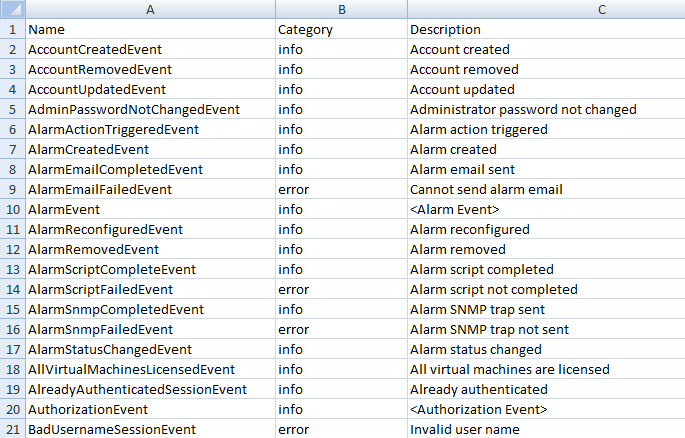
In my test environment the CSV contains 608 event types. That is mainly due to the fact that some optional components have their own events.
The Converter has his own events.Note that these events are known as ExtendedEvent objects and that you will have to use the Description to filter them out.
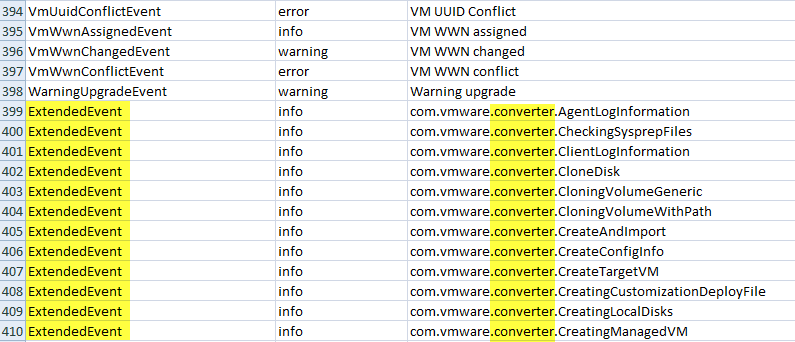
The Update Manager also defines it’s own events (marked in yellow) and that these are also know as ExtendedEvent objects.
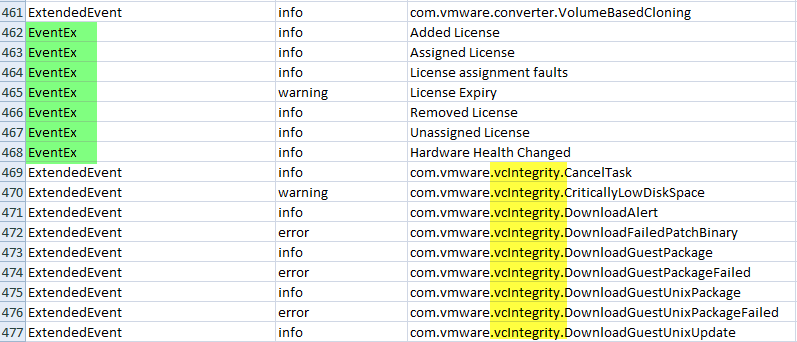
Notice in the previous screenshot the EventEx entries (marked in green). These represent License Manager related events.
I hope all this makes a bit easier to find the event types you need for your reports 😉
PS: the title of this post is a quote allegedly from Harold Macmillan.
Marcus
Six years old, but still an incredibly helpful post. Thank you for this.
Skywalker
Hi Luc,
Could you provide an example on how to use the Description to filter out ExtendedEvent objects? Many thanks.
LucD
Sure, expect a new post on ExtendedEvent filtering, but don’t hold your breath since I’m quite busy with the book and all 😉
sham
Thanks – ive also logged a case with out TAM so hopefully they may come back with something too (other than to go buy the new config control product that is 🙂
LucD
Hi Sham,
Have a look at Events – Part 3 : Auditing VM device changes. I think this does what you were looking for.
Luc.
sham
Hi Luc,
Slightly off topic but hopefully you can help…
Im trying to report on changes to Vms in real time by creating an event based alarm using the VMReconfigured event. This seems to work well and reports back when the change occurs but it seems it gives me everything I need except the ACTUAL change that was made.
E.g. Adding a NIC on a VM returns back a generic “VM Reconfigured” event and I can get the user that made the change, the object that was affected etc but not the fact that the NIC was added.
LucD
Hi Sham,
That’s indeed a good idea but I’m not sure if this can be extracted from the events.
I’ll have a look and do some testing.
Luc.
Paul
Hi Luc,
Do you know of anyway to differentiate between a vmotion and svmotion? Looking at the api reference there doens’t seem to be an event for each, just migration events. The only way I can see is for a svmotion the fullformattedmessage is
migrating vm from … to…
where as with vmotion it says
migrating VM of host…
LucD
Hi Paul,
No, unfortunately I don’t know how to differentiate between vMotion and svMotion.
In vSphere I see fullformattedmessage in VmBeingRelocatedEvent with this layout:
Relocating vmname in datacentername from esxname1 to esxname2where esxname1 is the same as esxname2 in case of an svMotion.
But that’s all. There is even, afaik, no indication of the datastores involved in case of a svMotion.
Luc.