
In the previous part of this series (Alarm expressions – Part 1 : Metric alarms) I showed how you could create alarms that are triggered when a metric crosses a watermark.
 In this part I will show you how to create alarms when one or more specific events occur in your vSphere environment. More specifically I will show you how to create an alarm that will fire when someone adds or removes a license from your vCenter.
Warning: this function will not work in vCenter 4.x when you are using the builtin licensing instead of the separate License Manager. I’ll post an update soon.
The first step for creating alarms based on this type of triggers is to define which event(s) to use. As I showed in Events, Dear Boy, Events – Part 2, there are an enormous number of possible events to chose from.
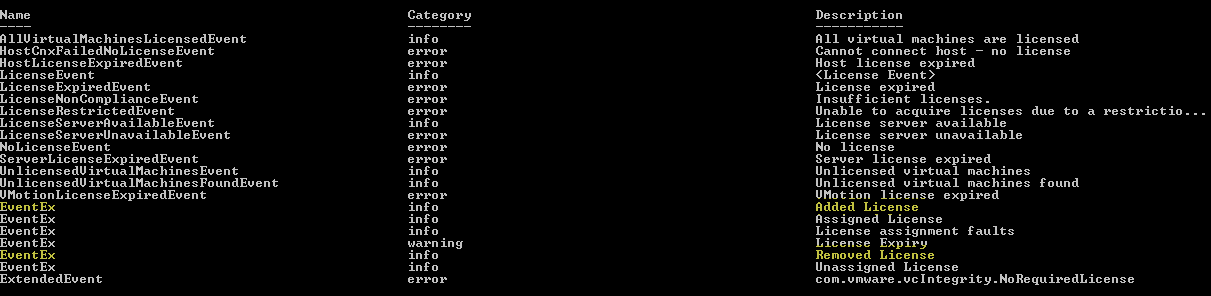
With the CSV file from that blog entry it’s easy to find out which events, related to licensing, are available. I used the following script for this
|
1 2 |
$targetStr = "license" Import-Csv "C:\Events.csv" -UseCulture | where {$_.Name -match $targetStr -or $_.Description -match $targetStr} |
From the output it is clear that I will have to use events from the EventEx type.
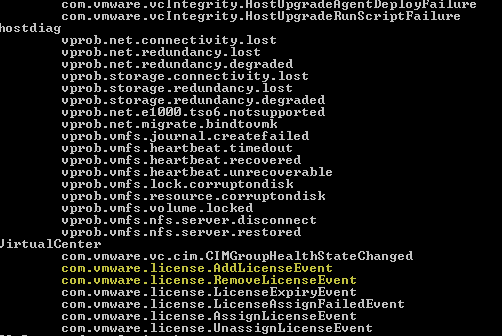
In the EventAlarmExpression description it says that one needs to pass an eventTypeId. Unfortunately the Reference Guide doesn’t explain how to get such an eventTypeId. After some trial and error I discovered you can get that property via the Extensionmanager. The following short script list all the extensions registered in your vSphere environment and shows their eventTypeIds.
|
1 2 3 4 5 6 7 8 9 |
$extMgr = Get-View ExtensionManager $extMgr.ExtensionList | %{ if($_.EventList -ne $null){ $_.Key $_.EventList | %{ "`t" + $_.EventId } } } |
The output of this script shows what I need.
The following script puts it all together and creates the alarm.
|
1 2 3 4 5 6 7 8 9 10 11 12 13 14 15 16 17 18 19 20 21 22 23 24 25 26 27 28 29 30 31 32 33 34 35 36 37 38 39 40 41 42 43 44 45 46 47 48 49 50 51 52 53 54 55 56 57 58 59 60 61 |
$dcName = "MyDatacenter" $mailto = "luc.dekens@lucd.info" $alarmMgr = Get-View AlarmManager $entity = Get-Datacenter $dcName | Get-View # AlarmSpec $alarm = New-Object VMware.Vim.AlarmSpec $alarm.Name = "Add/remove license" $alarm.Description = "Add or remove a license" $alarm.Enabled = $TRUE # Action - Send email $alarm.action = New-Object VMware.Vim.GroupAlarmAction $trigger1 = New-Object VMware.Vim.AlarmTriggeringAction $trigger1.action = New-Object VMware.Vim.SendEmailAction $trigger1.action.ToList = $mailTo $trigger1.action.Subject = "License added/removed" $trigger1.Action.CcList = "" $trigger1.Action.Body = "" # Transition 1a - yellow --> red $trans1a = New-Object VMware.Vim.AlarmTriggeringActionTransitionSpec $trans1a.StartState = "yellow" $trans1a.FinalState = "red" # Transition 1b - red --> yellow $trans1b = New-Object VMware.Vim.AlarmTriggeringActionTransitionSpec $trans1b.StartState = "red" $trans1b.FinalState = "yellow" $trigger1.TransitionSpecs += $trans1a $trigger1.TransitionSpecs += $trans1b $alarm.action.action += $trigger1 # Expression 1 - License added $expression1 = New-Object VMware.Vim.EventAlarmExpression $expression1.EventType = $null $expression1.eventTypeId = "com.vmware.license.AddLicenseEvent" $expression1.objectType = "Datacenter" $expression1.status = "yellow" # Expression 2 - License removed $expression2 = New-Object VMware.Vim.EventAlarmExpression $expression2.EventType = $null $expression2.eventTypeId = "com.vmware.license.RemoveLicenseEvent" $expression2.objectType = "Datacenter" $expression2.status = "yellow" $alarm.expression = New-Object VMware.Vim.OrAlarmExpression $alarm.expression.expression += $expression1 $alarm.expression.expression += $expression2 $alarm.setting = New-Object VMware.Vim.AlarmSetting $alarm.setting.reportingFrequency = 0 $alarm.setting.toleranceRange = 0 # Create alarm. $alarmMgr.CreateAlarm($entity.MoRef, $alarm) |
Annotations:
Line 40 & 47: although the SDK Reference says that the eventTypeId property replaces the EventType property you have to explicitly set the EventType property to $null. Otherwise the CreateAlarm method will fail
You can now automate the creation of your event-driven alarms.
Summer
Hi LucD,
In latest PowerCLI version 10.1.1, looks like there is no cmdlet to create events for specific alarm. Basically I just want to custom a new alarm with 3 new events as trigger events. But can not find anything to do it ?
Philippe
Hello,
thanks about your blog, it’s very helpfull. I have understand the following script from you:
https://www.lucd.info/2009/11/27/alarm-expressions-part-2-event-alarms/
but I dont know how I can create a Alarm with following settings:
Name: Host
Description Host test
Monitor: Host
Monitor for specific conditions or state, …
Trigger Type1: Host Connection state
Condition: is Equal to
Warning: None
Alert: Disconnected
Trigger Type2: Host Console SwapIn Rate (kBps)
Condition: is above
Warning: 1024
Condition Lenght: for 1 min
Alert: 4096
Condition Length: for 1 min
Action: Run a command
Configuration: c:\test.ps1
I will very happy if you can help me to solve my probelm.
Thank you
Philippe
Andreas Peetz
Luc,
I used your script to create another one that is compatible with vSphere 5.1 and uses some of the new alarm handling cmdlets from PowerCLI 5.1:
https://www.v-front.de/2013/06/creating-vcenter-alarms-with-powercli.html
Andreas
LucD
Thanks Andreas for creating the vSphere 5.1 version.
Very useful !
NiTRo
I just noticed the Transition comments mismatch with the code (yellow –> red and red –> yellow). Still, your alarm’s posts are a BIG source of knowledge Luc, Thanks again.
LucD
Thanks, well spotted 🙂
jrob24
Luc,
Did you ever get a chance to update this to work with vCenter 4.x?
LucD
@jrob24 No I’m afraid not (yet). Shame on me, but this book is eating away my free time. A couple more weeks 😉
jrob24
Luc,
When I run the script above it creates the alarm fine, however when I try to edit the alarm after creation I get the following error: Not initialized: vmodl.TypeName.eventType.
I tested the alarm and could not get it to alert either. Testing with vCenter 4.0U2 & PowerCLI 4.1. Any thoughts?
LucD
@Jason, you’re right. This doesn’t work anymore in vCenter 4.x due to the changed licensing extension. I’ll have to rewrite the script.