
Yesterday, Cody published on his Professional VMware blog an excellent article, called vSphere Host Died Abandon Ship! – vSphere vCenter Alarms & Actions.
The article shows a very elegant solution how to move your guests to “safer havens”, the moment one of the hosts in the cluster starts experiencing hardware problems.
The elegance of Cody’s solution is that he uses maintenance mode to force vMotion on all the powered-on guests on the host that experiences HW problems.
The condition for the solution to work is of course that the host needs to be a node in a DRS-enabled cluster where the Automation Level is set to Fully automated.
Since I thought that this was a good example of some of the alarm-related posts I did in the past, I created a script so you can automate the creation of Cody’s alarm.
|
1 2 3 4 5 6 7 8 9 10 11 12 13 14 15 16 17 18 19 20 21 22 23 24 25 26 27 28 29 30 31 32 33 34 35 36 37 38 39 40 41 42 43 44 45 46 47 48 49 50 51 52 53 54 55 56 57 58 59 60 61 62 63 64 65 |
$dcName = "MyDatacenter" $mailto = "lucd@lucd.info" $alarmMgr = Get-View AlarmManager $entity = Get-Datacenter $dcName | Get-View # AlarmSpec $alarm = New-Object VMware.Vim.AlarmSpec $alarm.Name = "Generic Host Health Alert" $alarm.Description = "When host reports HW health, place host in maintenance mode" $alarm.Enabled = $TRUE $alarm.action = New-Object VMware.Vim.GroupAlarmAction # Action 1 - Send email $trigger1 = New-Object VMware.Vim.AlarmTriggeringAction $trigger1.action = New-Object VMware.Vim.SendEmailAction $trigger1.action.ToList = $mailTo $trigger1.action.Subject = "HW Health - Set host in maintenance mode" $trigger1.Action.CcList = "" $trigger1.Action.Body = "" # Action 2 - Enter maintenance mode $trigger2 = New-Object VMware.Vim.AlarmTriggeringAction $trigger2.action = New-Object VMware.Vim.MethodAction $trigger2.action.Name = "EnterMaintenanceMode_Task" # Action 2 - Arguments $arg1 = New-Object VMware.Vim.MethodActionArgument # timeout $arg1.value = 0 # evacuatePoweredOffVms $arg2 = New-Object VMware.Vim.MethodActionArgument $arg2.value = $false $trigger2.action.argument += $arg1 $trigger2.action.argument += $arg2 # Transition - yellow --> red $trans = New-Object VMware.Vim.AlarmTriggeringActionTransitionSpec $trans.StartState = "yellow" $trans.FinalState = "red" $trigger1.TransitionSpecs += $trans $trigger2.TransitionSpecs += $trans $alarm.action.action += $trigger1 $alarm.action.action += $trigger2 # Expression - Hardware Health Changed $expression = New-Object VMware.Vim.EventAlarmExpression $expression.EventType = "EventEx" $expression.eventTypeId = "com.vmware.vc.cim.CIMGroupHealthStateChanged" $expression.objectType = "HostSystem" $expression.status = "red" $alarm.expression = New-Object VMware.Vim.OrAlarmExpression $alarm.expression.expression += $expression $alarm.setting = New-Object VMware.Vim.AlarmSetting $alarm.setting.reportingFrequency = 0 $alarm.setting.toleranceRange = 0 # Create alarm. $alarmMgr.CreateAlarm($entity.MoRef, $alarm) |
Annotations
Line 1: The script creates the alarm on a datacenter but you can easily replace that by any object that supports alarm definitions.
Line 26: When the alarm is fired this action will make a call to the EnterMaintenanceMode_Task.
Line 29-35: The EnterMaintenanceMode_Task method requires two arguments. For the first argument, called timeout, we specify 0 (zero) which indicates there is no timeout. The second argument, called evacuatePoweredOffVms, is a Boolean value that indicates if powered-off guests should also be migrated. We pass $false, meaning that the powered-off guest shall not be migrated.
Line 52-56: See my earlier post, called Alarm expressions – Part 2 : Event alarms, for more information on how to list the available events.
The result of the script is a new alarm identical to the one Cody created in the vSphere client.
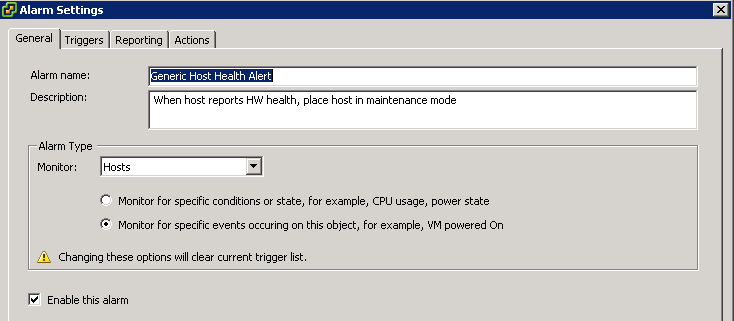

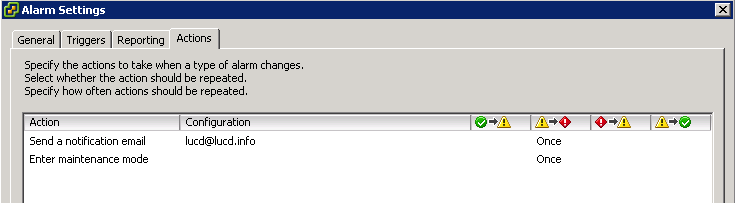
With this script you can now include the creation of this alarm in your automation process.
And the script has also shown that it is more flexible than the vSphere client. Try for example changing the parameters of the method (in this case EnterMaintenanceMode_Task) you use in the Actions.
Cody Bunch
Nice!
Carter Shanklin
Very nice!