
Another post in the dvSwitch series. This time I’ll tackle the creation and use of a private VLANs (PVLAN) on a dvSwitch.
For those that are not that familiar with PVLANs have a look at KB1010691, that article gives a good overview of the PVLAN concept. And there were several sessions during the last VMworld that talked about PVLANs. The most noteworthy being TA2525 VMware vSphere 4 Networking Deep Dive.
In short, PVLANs allows isolation for guests on a shared IP subnet.
To use PVLANs on a dvSwitch we need to execute a two-step process:
- Create the PVLANs on the dvSwitch
- Assign a PVLAN to a Portgroup
The start configuration is a regular dvSwitch which has three portgroups defined.
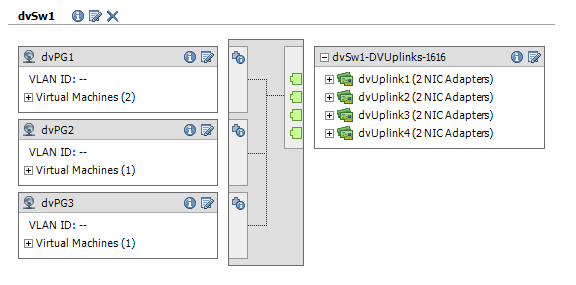
The dvSwitch has no PVLANs defined.
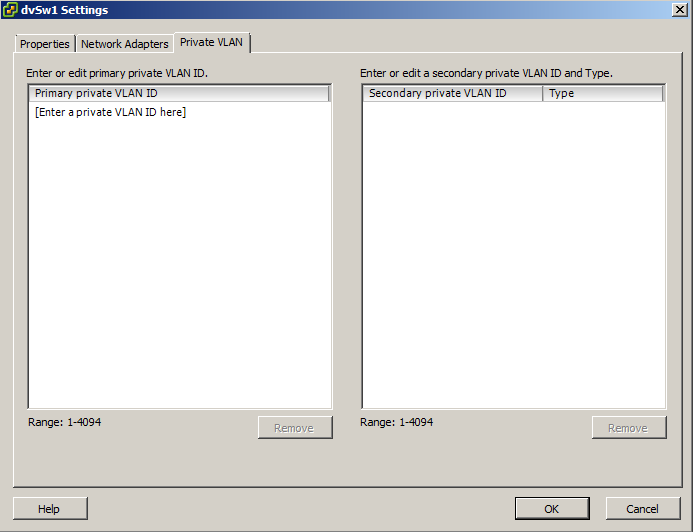
PVLAN creation
|
1 2 3 4 5 6 7 8 9 10 11 12 13 14 15 16 17 18 19 20 21 22 23 24 25 26 27 28 29 30 31 32 33 34 35 36 37 38 39 40 41 42 43 44 45 46 47 48 49 50 51 52 53 54 55 56 57 |
function Get-dvSwitch{ param($dcName,$dvSwName) $dcNetFolder = Get-View (Get-Datacenter $dcName | Get-View).NetworkFolder $found = $null foreach($net in $dcNetFolder.ChildEntity){ if($net.Type -eq "VmwareDistributedVirtualSwitch"){ $temp = Get-View $net if($temp.Name -eq $dvSwName){ $found = $temp } } } $found } function New-dvSwPVLAN{ param($dvSw, $primaryNr, [int[]] $secondaryNr, [string[]] $secondaryType) $spec = New-Object VMware.Vim.VMwareDVSConfigSpec # Primary $pvlan = New-Object VMware.Vim.VMwareDVSPvlanConfigSpec $pvlan.operation = "add" $pvlan.pvlanEntry = New-Object VMware.Vim.VMwareDVSPvlanMapEntry $pvlan.pvlanEntry.primaryVlanId = $primaryNr $pvlan.pvlanEntry.pvlanType = "promiscuous" $pvlan.pvlanEntry.secondaryVlanId = $primaryNr $spec.PvlanConfigSpec += $pvlan # Secondaries for($i = 0;$i -lt $secondaryNr.Count; $i++){ $pvlan = New-Object VMware.Vim.VMwareDVSPvlanConfigSpec $pvlan.operation = "add" $pvlan.pvlanEntry = New-Object VMware.Vim.VMwareDVSPvlanMapEntry $pvlan.pvlanEntry.primaryVlanId = $primaryNr $pvlan.pvlanEntry.pvlanType = $secondaryType[$i].ToLower() $pvlan.pvlanEntry.secondaryVlanId = $secondaryNr[$i] $spec.PvlanConfigSpec += $pvlan } $dvSw.UpdateViewData() $spec.ConfigVersion = $dvSw.Config.ConfigVersion $taskMoRef = $dvSw.ReconfigureDvs_Task($spec) $task = Get-View $taskMoRef while("running","queued" -contains $task.Info.State){ $task.UpdateViewData("Info") } } $datacenterName = "Home1" $dvSwitchName = "dvSw1" $dvSw = Get-dvSwitch $datacenterName $dvSwitchName New-dvSwPVLAN $dvSw 2 102,202 "community","isolated" |
Annotations
Line 1-15: The Get-dvSwitch function was already discussed in Part 2 of the dvSwitch series.
Line 18: The parameters $secondayNr and $secondaryType are defined as arrays. That way the function can handle the creation of multiple secondary PVLANs in one call.
Line 37: The PVLAN typenames are case sensitive! To avoid errors, the script converts the passed typenames to lowercase. Just to make sure 😉
Line 42-43: As with any dvSwitch method, it’s important to pass the correct ConfigVersion. Otherwise you get a message saying “Cannot complete operation due to concurrent modification by another operation“.
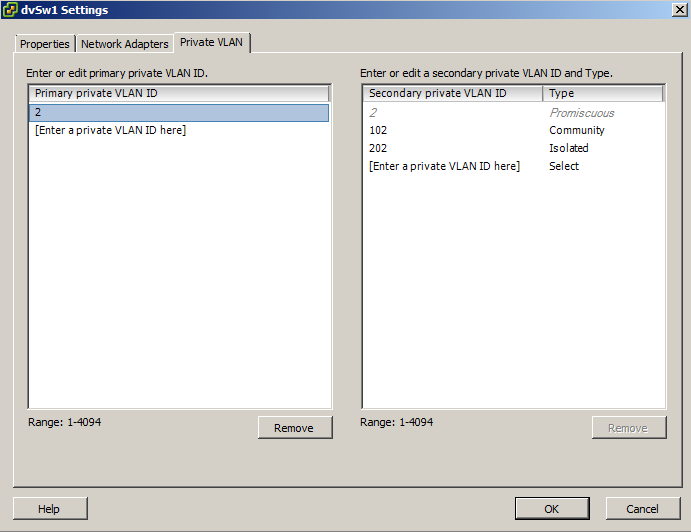
Line 57: This sample call creates a Primary PVLAN with VLAN Id 2, a Secondary PVLAN of type Community with VLAN Id 102 and another Secondary PVLAN of type Isolated with VLAN Id 202.
Portgroup assignment
|
1 2 3 4 5 6 7 8 9 10 11 12 13 14 15 16 17 18 19 20 21 22 23 24 25 26 27 28 29 30 31 32 33 34 35 36 37 38 39 40 41 42 43 44 45 46 47 48 49 50 51 |
function Get-dvSwitch{ param($dcName,$dvSwName) $dcNetFolder = Get-View (Get-Datacenter $dcName | Get-View).NetworkFolder $found = $null foreach($net in $dcNetFolder.ChildEntity){ if($net.Type -eq "VmwareDistributedVirtualSwitch"){ $temp = Get-View $net if($temp.Name -eq $dvSwName){ $found = $temp } } } $found } function Set-dVSwPgPVLAN{ param($dvSw, $dvPgName, $pvlanNr) # Find the portgroup $dvSw.Portgroup | % { $dvPgTemp = Get-View -Id $_ if($dvPgTemp.Name -eq $dvPgName){ $dvPg = $dvPgTemp } } $spec = New-Object VMware.Vim.DVPortgroupConfigSpec $spec.defaultPortConfig = New-Object VMware.Vim.VMwareDVSPortSetting $spec.defaultPortConfig.vlan = New-Object VMware.Vim.VmwareDistributedVirtualSwitchPvlanSpec $spec.defaultPortConfig.vlan.pvlanId = $pvlanNr $dvPg.UpdateViewData() $spec.ConfigVersion = $dvPg.Config.ConfigVersion $taskMoRef = $dvPg.ReconfigureDVPortgroup_Task($spec) $task = Get-View $taskMoRef while("running","queued" -contains $task.Info.State){ $task.UpdateViewData("Info") } } $datacenterName = "Home1" $dvSwitchName = "dvSw1" $dvSw = Get-dvSwitch $datacenterName $dvSwitchName Set-dvSwPgPVLAN $dvSw "dvPG1" 2 Set-dvSwPgPVLAN $dvSw "dvPG2" 102 Set-dvSwPgPVLAN $dvSw "dvPG3" 202 |
Annotations
Line 1-15: The Get-dvSwitch function was already discussed in Part 2 of the dvSwitch series.
Line 20-26: The scripts looks for the DistributedVirtualPortgroup object in order to pass the correct ConfigVersion (see line 34).
Line 49-51: The call to the dvSwPgPVLAN requires you to pass the portgroupname and Secondary PVLAN Id.
The final result, the three portgroups have now each been assigned to a PVLAN.

Get-View -ViewType VirtualMachine | %{
if($_.Config.Hardware.Device | where{$_.gettype().Name -eq “VirtualSerialPort”}){
$_.Name
}
}