Archive

Archive for the ‘Tools’ Category

My favorite PowerShell editor is free now!

October 23rd, 2012 1 comment

I rarely post about products, since I want to keep my blog “technical“, but there was some big news from Idera today.
As from version 4.6, their famous PowerShell Plus editor is now a free tool.

This is the editor I have been using to write, and debug, my PowerShell and PowerCLI scripts since day 1.

It would take me several pages to list the features I like and use in PowerShell Plus, but there are 2 that were ‘love at first sight’ for me; the Debug mode and the Variables pane. You can’t go without those when you are writing a script.

So why not give it a try, it’s for free now :-)

Get your tasklog here!

November 4th, 2010 2 comments

It happens quite often that you launch a PowerCLI cmdlet or a call to a SDK method or a script and that you get a rather cryptic message that something went wrong. One source of information to find out what went wrong are the vCenter’s vpxd log or the ESX(i) server’s hostd log.

But these logs are flooded with messages and it’s often quite hard to find the messages that relate to your task.

When running against a vCenter Server you can set the vCenter’s Logging Options to “Verbose” or “Trivia“. That produces more information in the logs but that often also makes it harder to find/extract the information that belongs to your task. And who has never forgotten to set the the Logging Options back to their original state when done with debugging ?

To make life a bit easier, I wrote a function that automates the above steps. I expanded on a function that I was using privately, and made it more general. This function allows you to retrieve the log entries for one specific or all recent task. The function also allows you to pass a cmdlet, or even a complete script, run the script in an elevated Logging Options mode and returns the task-related log entries.

Read more…

Taking the new Onyx 2.0 for a spin

September 6th, 2010 2 comments

One of the announcements during VMworld 2010 in San Francisco that perhaps got a bit obscured by the other “big” announcements, was the release of Onyx 2.0. For those of you that hadn’t heard of Project Onyx before, this nifty little tool captures all SOAP traffic that is passed between your vSphere client or PowerCLI session and the vCenter or ESX(i) server to which you are connected.

And that’s not all, the Onyx program will translate the captured SOAP traffic into PowerShell code. This allows you to see which vSphere APIs are used and how parameter objects for these methods are constructed.

Update September 16th 2010: the Onyx Development Team has just released a new build (2.0.3910.32223) that fixes some issues when using Onyx with the PowerCLI client.  Congratulations to the Onyx Development Team for this quick resolution of the problem !

Read more…

Changing VMware Tools scripts

May 7th, 2010 No comments

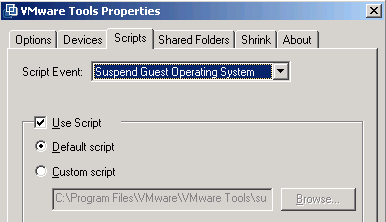
There was another interesting question on the PowerCLI community. Mike was wondering if it would be possible to change the VMware Tools scripts with a PowerCLI script. As far as I can see there are two options available with the VMware Tools scripts.

  1. You can run the default scripts that are installed on the guests when you install VMware Tools
  2. You can use Custom scripts and you have to specify the path of these scripts to VMware Tools

To use the 2nd option you will need, as William already pointed out, the VIX APIs.

But if you can live with the first option, and reuse the default scripts, the current PowerCLI build has all you need.

Read more…

Categories: PowerCLI, PowerShell, Tools Tags: , ,

My PS toolbelt

September 9th, 2009 2 comments

A question I get quite regularly is what tools and utilities do I use for developing PowerShell and PowerCLI scripts. The following list should shed a bit of light. A warning, this is my personal selection of tools and utilities and it is not my intention to convince anyone to switch to any of the tools mentioned. Read more…

Categories: PowerShell, Tools Tags: ,